Why Is My Google Business Profile Not Showing Up in Maps Search
If you’ve set up your Google Business Profile but it doesn’t appear when people search on Google Maps, you’re not alone. This is super frustrating for small business owners. You want customers to find you easily, right?
Your Google Business Profile not showing up means lost walks-ins, calls, and sales. The good news? Most issues have clear fixes. In this guide, we’ll walk through the common reasons and exactly what you can do step by step. Let’s get your business showing up!
What Is a Google Business Profile and Why Does It Matter?
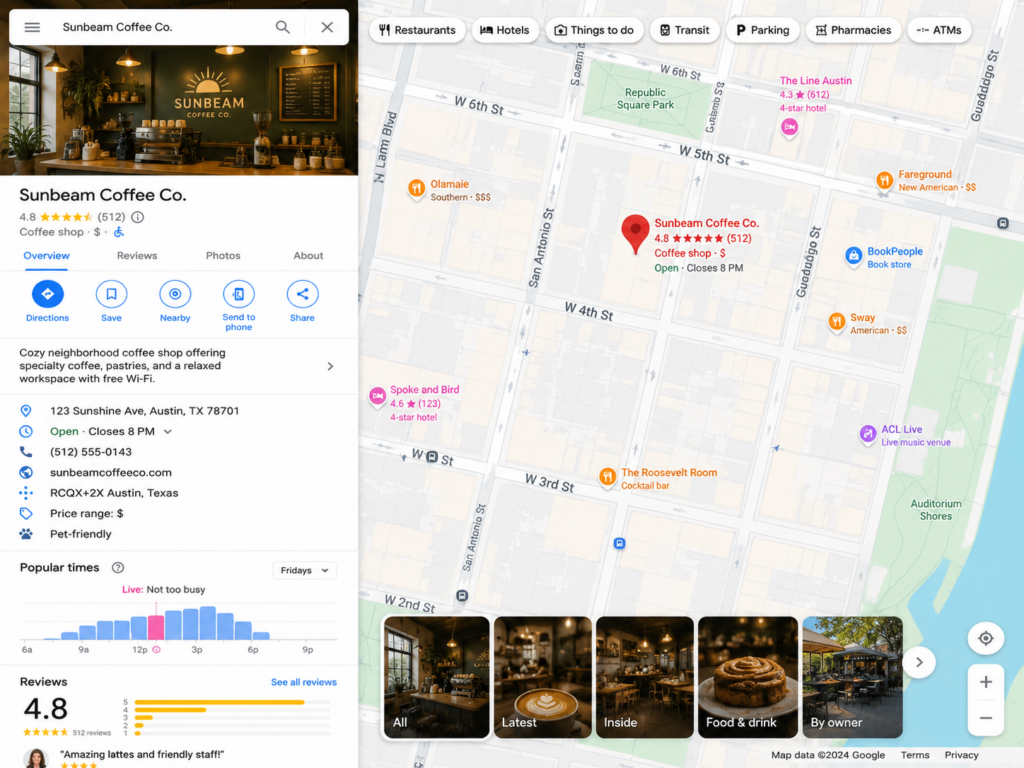
A Google Business Profile (formerly Google My Business) is your free listing on Google. It shows your address, hours, photos, reviews, and more on Search and Maps.
When someone searches “coffee shop near me” or your business name, your profile can pop up with a map pin. Without it showing, customers might go to competitors instead.
Many owners create a profile but miss key steps. That’s when problems start.
Top Reasons Your Google Business Profile Not Showing Up
Here are the most common culprits. We’ll cover why they happen and how to fix them.
1. Your Profile Isn’t Verified Yet
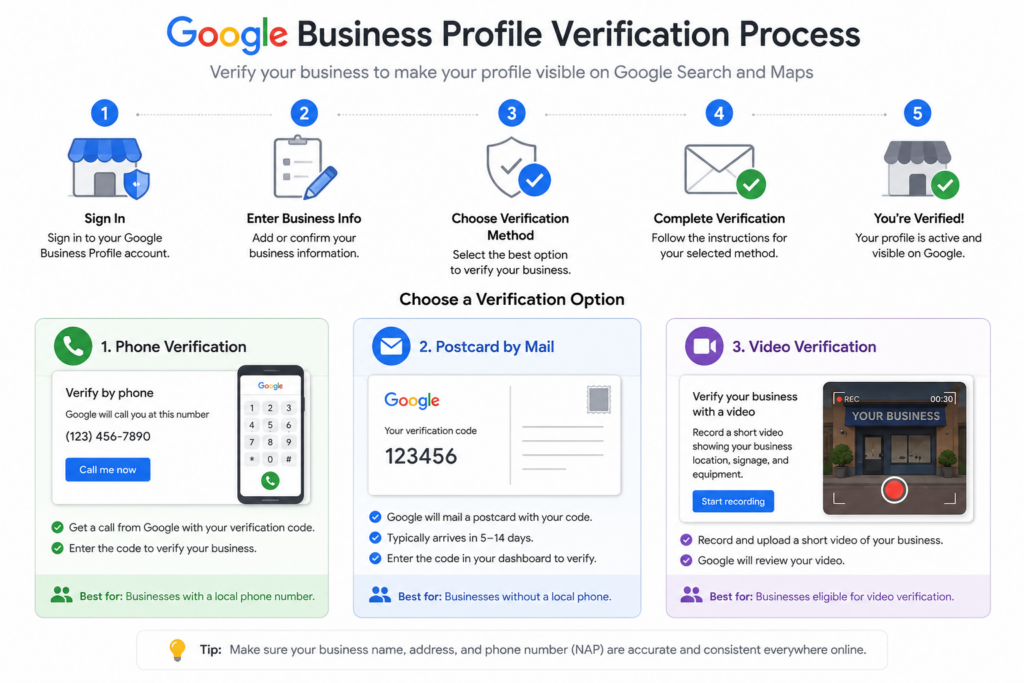
This is the #1 reason. Google only shows verified businesses. If you created the profile but didn’t finish verification, it stays hidden or limited.
Why it happens: Verification proves you’re the real owner. Google uses phone, postcard, video, or email.
How to fix it:
- Log in at business.google.com.
- Look for the verification prompt.
- Choose your method (phone is fastest if available).
- Follow the steps exactly.
It can take a few days to a couple of weeks for approval. Be patient, but check back often.
Real-life example: Sarah, a bakery owner, set up her profile but forgot verification. After a quick phone call, her shop appeared on Maps within days. Customers started coming in!
2. Your Listing Got Suspended
Sometimes profiles get suspended for breaking rules. When this happens, your Google Business Profile not showing up at all is common.
Common suspension reasons:
- Duplicate listings
- Wrong or fake address
- Spammy keywords in your name
- Poor quality photos or content
- Multiple people managing it incorrectly
How to check and fix:
- Log into your dashboard. You’ll usually see a red notice.
- Read Google’s message carefully.
- Fix the issue (like removing duplicates).
- Submit an appeal with proof, such as utility bills or photos of your storefront.
Google reviews appeals. It can take time, so provide clear evidence.
Tip: Avoid creating new profiles while appealing. That can make things worse.
3. Wrong or Incomplete Business Information
Google loves accurate, full details. If info is missing or wrong, your profile may not show.
Check these areas:
- Business name (keep it exact – no extra keywords)
- Address (must match reality)
- Phone number
- Hours (update for holidays too)
- Categories (choose primary and secondary ones carefully)
- Website link
Action steps:
- Open your profile editor.
- Fill every section.
- Add photos – at least 10 real ones of your location, products, and team.
- Write a clear description with what you offer.
Example: A plumber listed “Emergency Plumbing Services” as the name. Google flagged it. Changing to the real name fixed visibility.
4. Service Area Business Issues
If you don’t have a public storefront (like a mobile service or home-based business), you might have set it as a “service area business.”
This can hide your pin on Maps unless you check the right box.
Fix:
- Go to Info > Address.
- Select “I serve customers at my business address” if true.
- Add service areas (cities or zip codes you cover).
This helps you show up without revealing your exact home address.
5. Duplicates and Ownership Problems
Google hates duplicates. If another listing exists for your business, yours might get hidden.
How to spot duplicates:
- Search your exact business name on Maps.
- Look for similar listings.
- Claim any old ones.
Merge or request removal of duplicates through Google support.6. Not Enough Relevance, Distance, or Prominence
Google uses three main factors for Maps results: Relevance, Distance, and Prominence.
- Relevance: Does your profile match the search? Use right categories and post updates.
- Distance: You won’t show far away unless it’s a broad search.
- Prominence: More reviews, good ratings, website links, and activity help.
Boost prominence:
- Ask happy customers for reviews.
- Reply to every review.
- Post regular updates (offers, events, photos).
- Add services and products.
7. Recent Changes or New Business
New businesses or address changes can take time to appear. Google needs to trust the update.
Wait 1-2 weeks after changes. Re-verify if asked.
Other Common Concerns
- Inconsistent NAP (Name, Address, Phone): Make sure your info matches on your website, Facebook, Yelp, and directories. Inconsistencies confuse Google.
- Low Activity: Inactive profiles get buried. Post weekly and engage.
- Technical Glitches: Clear your browser cache or try incognito mode. Sometimes it’s just your view.
- Competition: In busy areas, even good profiles need strong optimization to stand out.
Step-by-Step Checklist to Fix Your Google Business Profile Not Showing Up
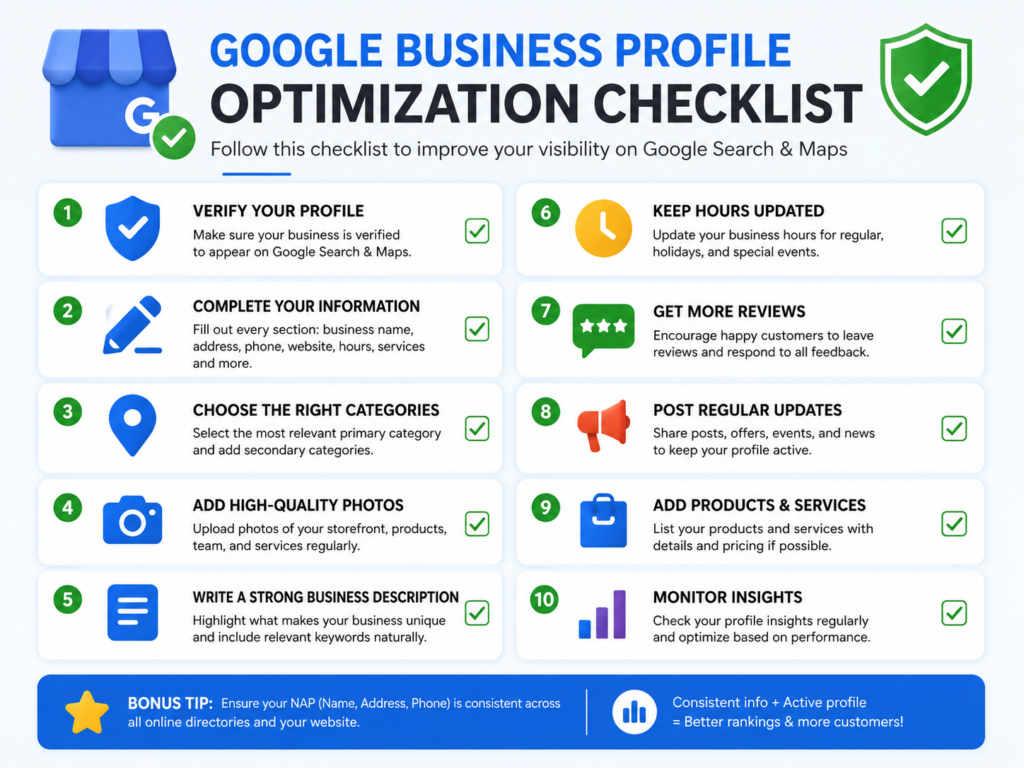
- Log in and verify (or re-verify).
- Complete every info section 100%.
- Fix any suspensions or duplicates.
- Add high-quality photos and posts.
- Get 5-10 fresh reviews.
- Check on different devices and locations.
- Be patient – changes can take days.
Pro Tip: Use Google’s “Find your business on Google” tool for extra help.
Real Stories from Business Owners
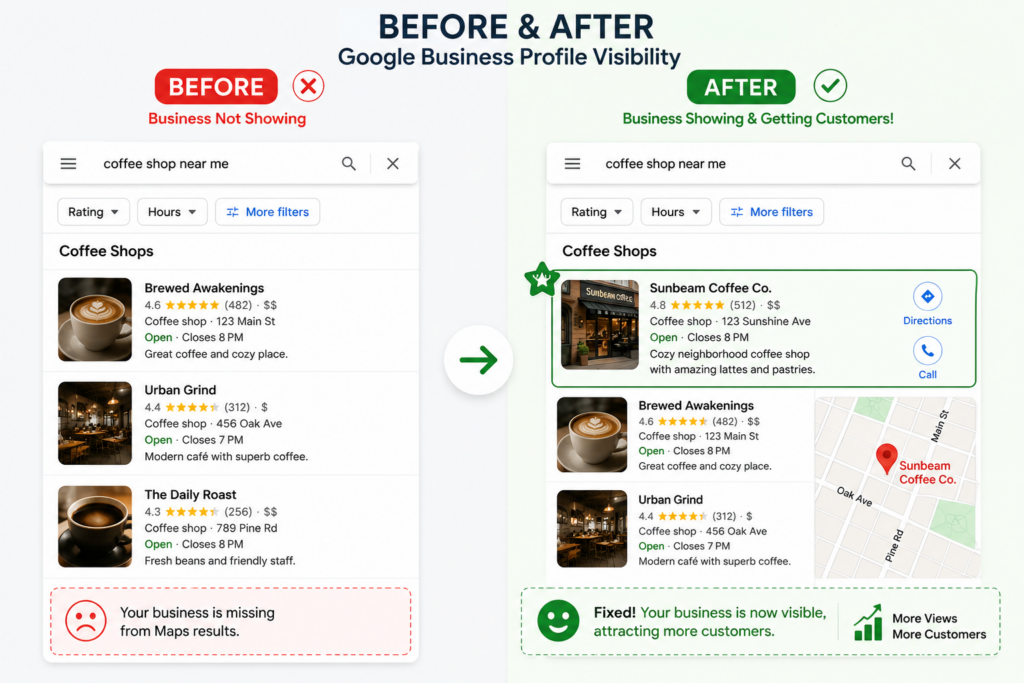
Mike runs a local gym. His profile vanished after an address tweak. He appealed the suspension with photos and documents. Two weeks later, it was back stronger with more calls.
Lisa, a hair stylist (service area only), forgot the service address checkbox. After fixing it, clients found her easily on Maps.
These fixes work for many people.
How Long Does It Take to Show Up?
- Verification: 1-14 days
- After fixes: Usually 3-7 days
- Full visibility with activity: 2-4 weeks
Keep improving your profile during the wait.
Extra Tips to Stay Visible Long-Term
- Post offers and news regularly.
- Use Google Posts feature.
- Monitor insights in your dashboard.
- Encourage reviews politely.
- Keep info updated always.
- Build a simple website if you don’t have one.
- Get listed on other directories consistently.
Avoid black-hat tricks like fake reviews. Google catches them and can suspend you.
Frequently Asked Questions
Can I have multiple profiles? No, one per business location usually.
What if appeal gets rejected? Wait, fix issues better, then appeal again with more proof.
Does it cost money? No, the basic profile is free.
Should I hire help? For tricky suspensions, a local SEO expert can save time.
Take Action Today!
Don’t let your Google Business Profile not showing up cost you customers. Start with verification and a full profile check right now.
Open business.google.com, fix one thing today, and watch your visibility grow. Your next customer is probably searching Maps this minute!
If you follow these steps, you’ll see great results. Got questions? Drop them in the comments or check Google’s help center. You’ve got this – go make your business easy to find!

Arbaz Shaukat is a Local SEO Expert who helps websites generate more leads, traffic, and sales from Google and AI-driven search platforms like ChatGPT through proven SEO strategies. He is the Founder of GBP Optimization Services, where he works closely with businesses to improve their online visibility on the internet.
Since 2020, Arbaz has been active in SEO and loves to share experience-based blog content offering practical insights, tested SEO techniques, and real-world strategies that help businesses grow and compete effectively online.