GBP Optimization Checklist 2027: 25 Steps to Rank Higher on Google Maps
Everything to check on your Google Business Profile, in the order that matters most for rankings and calls.
- Google ranks local results on relevance, distance and prominence. Your profile controls relevance and part of prominence.
- Your primary category is the single most important setting on the profile.
- Complete, accurate information beats clever tricks. Keyword-stuffed names and fake addresses get profiles suspended.
- Reviews, photos and posts keep the profile active and win the click once you rank.
Most Google Business Profiles are set up once and never touched again. That leaves easy rankings on the table. This checklist covers the 25 checks we run on every profile before any other local SEO work starts, grouped in the order that has the biggest effect on rankings and calls.
Google says local results are based mainly on three things: relevance, distance and prominence (Google Business Profile Help). You can’t change your distance from a searcher, so this checklist focuses on the two you can influence.
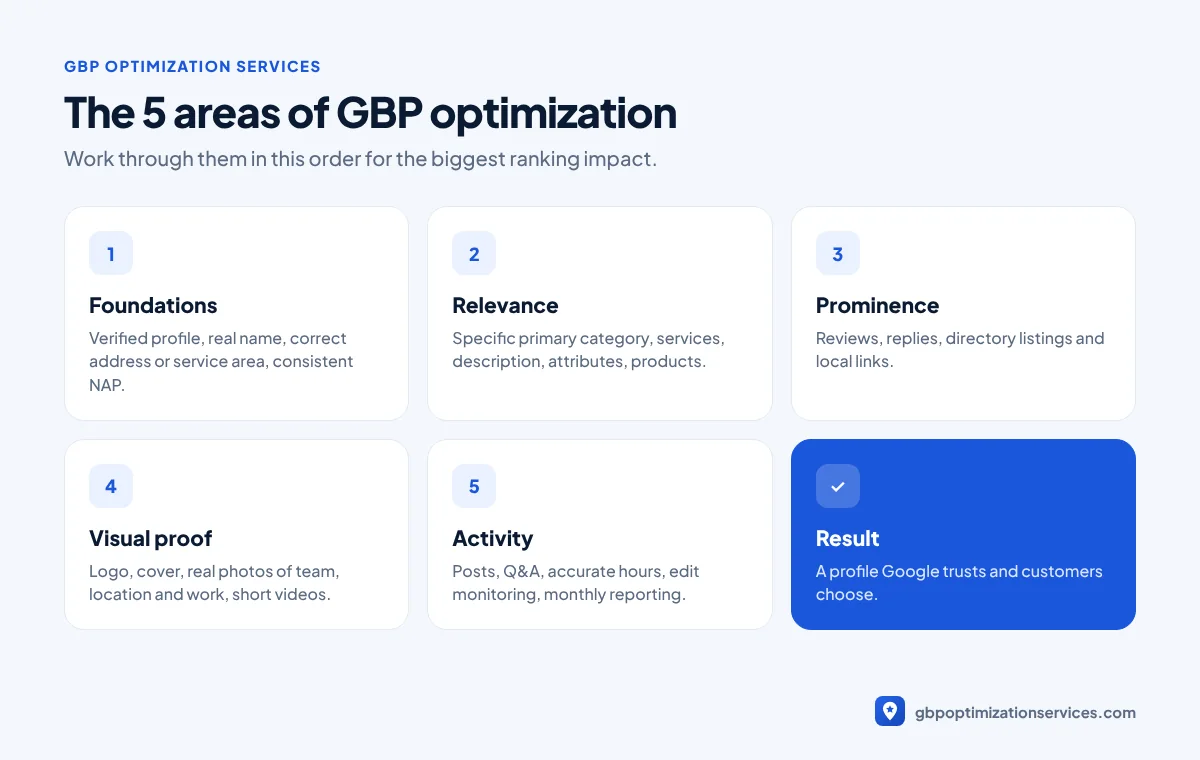
1. Foundations: get the basics exactly right
These settings decide whether your profile is eligible to rank at all, and whether it stays live.
- Verify the profile. Unverified profiles rarely rank. Google says verification shows you are authorized to represent the business.
- Use your real business name. Match your signage, website and paperwork. Adding keywords like “Best Plumber Austin” breaks Google’s guidelines and is a common suspension trigger.
- Choose the right business type. If customers visit you, show your address. If you travel to customers, hide the address and set a service area.
- Keep name, address and phone (NAP) identical everywhere. Your website, profile and directory listings should match character for character.
- Use a local phone number that rings at your business, not a call-tracking number that changes.
2. Relevance: tell Google exactly what you do
Relevance is how well your profile matches what someone searched. This is where most profiles lose rankings.
- Pick the most specific primary category. “Emergency plumber” searches are won by the category Plumber, not Contractor. Check what the top three competitors in your area use.
- Add secondary categories only for services you genuinely offer.
- List every service in the Services section, with a short description for each.
- Write a clear business description (up to 750 characters) that says what you do, where, and for whom. Write for customers first.
- Fill in attributes such as wheelchair access, online appointments or women-owned, where they apply.
- Add products if you sell or price specific packages. They show up prominently on mobile.
| Setting | Common mistake | What to do instead |
|---|---|---|
| Primary category | Too broad (e.g. Contractor) | Most specific match for your main service |
| Business name | Keywords added | Exact real-world name |
| Services | Left empty | Every service listed with a description |
| Description | Keyword list | Plain sentences for customers |
| Service area | Too wide or missing | The areas you really serve |
3. Prominence: build trust signals
Prominence is how well known your business is. Google lists reviews and links from other websites as part of it.
- Ask every customer for a review. Make it easy with a direct review link or QR code.
- Reply to every review, positive and negative, within a few days.
- Never offer rewards for reviews. Discounts or gifts in exchange for reviews break Google’s policies.
- Get listed on key directories with the same NAP details as your profile.
- Earn local links from suppliers, local news, associations and sponsorships.

Get a free Google Business Profile audit, reviewed personally by Arbaz. Usually within 24 hours.
4. Visual proof: photos and videos
Photos help customers choose you after you rank. They also show Google that the business is real and active.
- Upload a logo and cover photo that match your branding.
- Add real photos of your team, vehicles, location and finished work. Avoid stock images.
- Add new photos regularly, for example after each notable job.
- Add short videos of your work or premises where it makes sense.
5. Activity: keep the profile alive
An active profile gives customers confidence and keeps your information fresh.
- Publish Google posts for offers, updates and seasonal services.
- Add questions and answers that customers actually ask, and monitor new questions.
- Keep hours accurate, including special hours for holidays.
- Watch for unwanted edits. Anyone can suggest changes to your profile, and some go live without you noticing.
- Check your Performance report monthly for calls, direction requests and website clicks.
Common mistakes that hold profiles back
Even well-run businesses make the same handful of mistakes. These are the ones we fix most often during an audit:
- Choosing a broad primary category because it sounds bigger. A narrower, accurate category almost always ranks better for the searches that bring in jobs.
- Leaving the services section empty. Google uses it to match you to specific searches, and customers use it to check you do what they need.
- Uploading only stock photos. Customers can spot them, and they add nothing to your credibility.
- Ignoring negative reviews. A calm, helpful reply turns a bad review into proof that you care.
- Changing many details at once. Large edits can trigger re-verification. Make important changes one at a time.
- Using a call-tracking number as the main phone. If you need tracking, add it carefully and keep your main local number consistent across the web.
A simple monthly routine
Once the profile is optimized, keeping it in shape takes about an hour a month:
| Task | How often | Time |
|---|---|---|
| Reply to new reviews | Weekly | 10 minutes |
| Publish a Google post | Weekly or every two weeks | 10 minutes |
| Upload new photos | Monthly | 10 minutes |
| Check for unwanted edits and questions | Monthly | 10 minutes |
| Review the Performance report | Monthly | 15 minutes |
If you don’t have time for this, our monthly GBP management covers every task above.
How long does it take to see results?
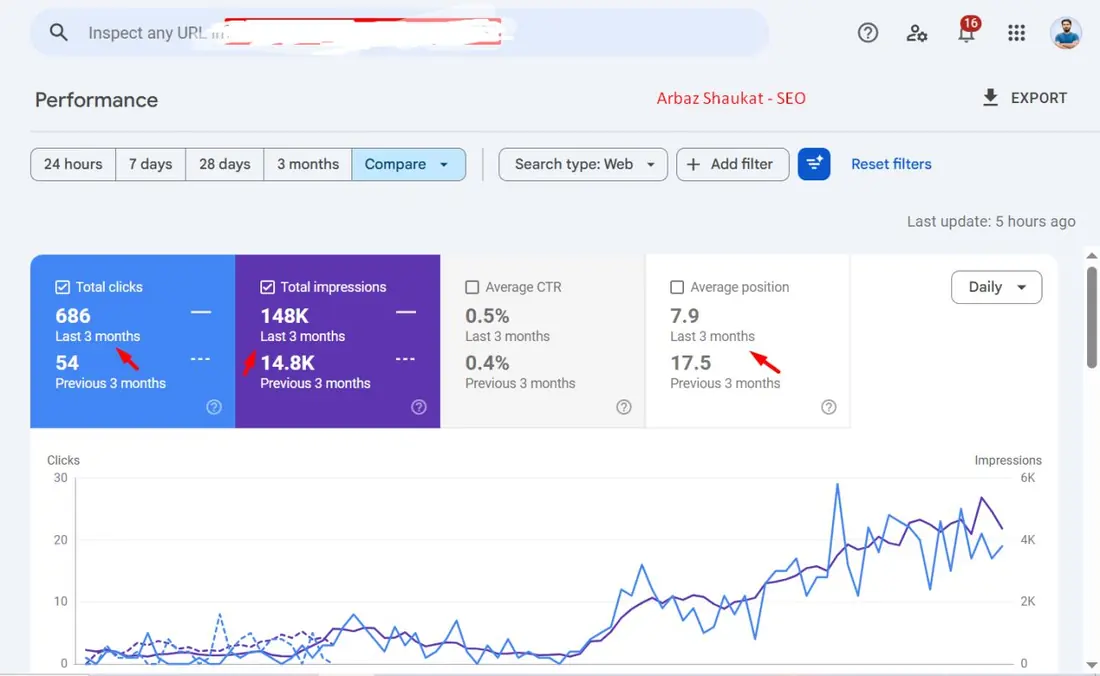
It depends on your market. In our work, many profiles see movement within the first few weeks of fixing categories, services and content, with stronger growth over the following months as reviews and activity build up. For example, one local business we worked with went from 54 to 686 Google clicks in three months after its profile and website were optimized together.
Want us to run this checklist for you?
Every point above is part of our GBP optimization service, and the website side is covered by our local SEO services. If you’d rather keep doing it yourself, start with steps 1, 6 and 12. They have the biggest effect for the least effort.
Frequently asked questions
Check it at least monthly. Add new photos and posts regularly, reply to reviews within a few days and update special hours before holidays.
Google names relevance, distance and prominence. On the profile itself, the primary category has the biggest effect on which searches you appear for.
No. Your business name must match your real-world name. Adding keywords breaks Google’s guidelines and can lead to suspension.
Posts mainly help conversions by giving customers fresh, useful information. They also show your profile is active, which supports trust.
Arbaz Shaukat
Arbaz has spent more than 7 years ranking local businesses on Google Maps, and now in AI search. He built and refined his own Google Business Profile strategies across industries such as home services, transport and healthcare, and personally plans every client project. Results from his work include 54 to 686 Google clicks in three months and a 150% increase in calls for a private taxi service.
Ready to be the business customers pick first?
Get a free GBP audit, reviewed personally, usually within 24 hours.