How to Get More Google Reviews Without Breaking Google’s Rules
A simple, compliant system to earn more 5-star reviews from real customers.
- Most happy customers will leave a review if you ask at the right time and make it easy.
- A direct review link or QR code removes most of the friction.
- Google does not allow incentives or review gating. Ask every customer, with no reward attached.
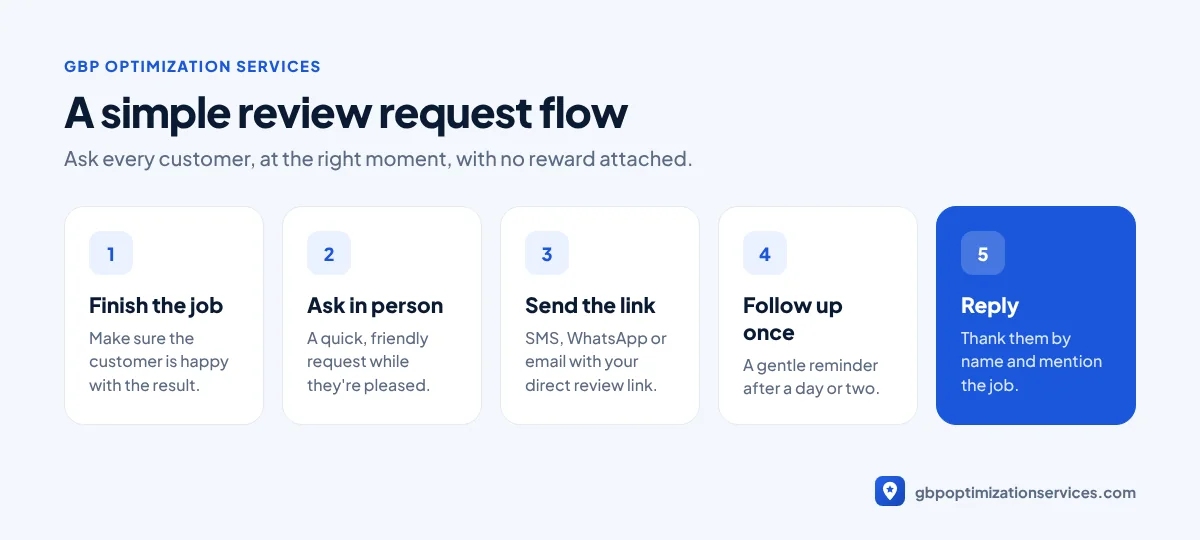
- Reply to every review. Future customers read your replies as closely as the reviews.
Reviews influence where you rank on Google Maps and, just as importantly, whether people choose you once they see you. Google lists the number and rating of reviews as part of a business’s prominence (Google Business Profile Help).
The problem is simple: happy customers rarely leave reviews on their own. This guide shows a practical system to get more of them, without risking your profile.
Why most businesses don’t get enough reviews
Most businesses don’t ask, ask at the wrong moment, or make the process too hard. A customer who has to search for your profile, find the review button and log in will often give up. Fixing those three problems is usually enough to see a steady increase.
Step 1: Get your direct review link
Your Google Business Profile has a “Ask for reviews” option that gives you a short link. That link opens the review form directly. Save it somewhere your whole team can use it.
Step 2: Ask at the right moment
Timing matters more than wording. Ask when the customer is happiest:
- Right after a job is finished and the customer is pleased with the result.
- When a customer thanks you or compliments your team.
- In the follow-up message or invoice email, within 24 hours of the service.
Step 3: Make it easy everywhere
| Where | How to use your review link |
|---|---|
| SMS or WhatsApp | Short thank-you message with the link, sent the same day |
| Link in the follow-up or invoice email | |
| Printed QR code | On receipts, business cards, counters and vehicles |
| Website | A “Review us on Google” button in the footer or thank-you page |
| In person | Show the QR code on a phone or card at checkout |
Step 4: Use a simple message template
Short and personal works best. For example:
Hi Sarah, thanks for choosing us today. If you were happy with the work, would you mind leaving a quick Google review? It really helps a local business like ours: [your link]
Encourage customers to mention what you did and where, such as “replaced our water heater in Round Rock”. Detailed reviews help future customers decide, and they give Google more context about your services.

Get a free Google Business Profile audit, reviewed personally by Arbaz. Usually within 24 hours.
More templates you can copy
Email after the job:
Subject: Thanks for choosing [Business]
Hi [Name], thank you for trusting us with [job]. If you have a minute, we’d really appreciate an honest Google review. It helps other people in [city] find a business they can trust: [your link]
In person, at the end of the job:
“We’re a local business and reviews really help us. Would you be happy to leave us a quick Google review? I can send you the link right now.”
Follow-up reminder (once only):
Hi [Name], just a quick reminder in case you missed our message. Here’s the link if you’d like to leave a review: [your link]. Thanks again!
Keep follow-ups to one. Repeated reminders annoy customers and rarely work.
What Google does not allow
Google’s policies are strict about fake engagement, and enforcement has increased. These practices can lead to removed reviews, blocked new reviews or a public warning on your profile:
- Incentives: discounts, gift cards, free services or prize draws in exchange for a review, positive or negative.
- Review gating: only asking customers you think are happy, or filtering people before sending them to Google.
- Fake reviews: buying reviews or asking staff, friends or family to review your business.
- Paying to change a review: offering anything to remove or edit a negative review.
Step 5: Reply to every review
Replies show customers that you’re active and accountable. Thank positive reviewers by name and mention the job if you can. For negative reviews, stay calm, acknowledge the concern and offer to resolve it offline. A professional reply often matters more to future customers than the review itself.
How to handle a negative review
A negative review feels personal, but it’s also a chance to show future customers how you handle problems.
- Don’t reply in anger. Wait until you can respond calmly.
- Thank them and acknowledge the issue, without arguing about details in public.
- Offer to resolve it offline, with a name and a way to contact you.
- Fix the problem if you can. Some customers update their review after a good resolution, but never ask them to in exchange for anything.
- Report only genuine policy violations, such as spam, offensive content or reviews from someone who was never a customer.
Mistakes that slow review growth
- Asking days or weeks after the job, when the customer has moved on.
- Sending customers to your profile instead of the direct review form.
- Asking only once a year in a big campaign instead of after every job.
- Leaving reviews unanswered, which makes the profile look inactive.
Step 6: Track your progress
Check your review count, average rating and reply rate every month, and compare them with your top three competitors. Steady growth beats a sudden burst, which can look unnatural.
Need help building a review system?
Our review management service sets up review links, QR codes and templates for your team, replies to every review and tracks your progress, all within Google’s rules. It works best alongside our monthly GBP management.
Frequently asked questions
Yes. Google allows and encourages businesses to ask customers for reviews. What’s not allowed is offering incentives or only asking customers you expect to be happy.
No. Google’s policies don’t allow incentives for reviews, even if you ask for honest feedback.
There’s no fixed number. Aim to match or beat your top local competitors and to keep getting new reviews every month.
Yes. Replies show you’re active and help future customers trust your business, especially on negative reviews.
Arbaz Shaukat
Arbaz has spent more than 7 years ranking local businesses on Google Maps, and now in AI search. He built and refined his own Google Business Profile strategies across industries such as home services, transport and healthcare, and personally plans every client project. Results from his work include 54 to 686 Google clicks in three months and a 150% increase in calls for a private taxi service.
Ready to be the business customers pick first?
Get a free GBP audit, reviewed personally, usually within 24 hours.