How to Pick the Right Primary Category for Google Business Profile
Pick the single most specific Google Business Profile category that matches what your business fundamentally is, not everything it does. Your primary category is the strongest signal Google uses to decide which local searches you appear in. Confirm your choice by checking what top-ranking competitors use, then move every extra service into the Services section.
Most business owners treat category selection like a checklist. Pick a few options, add some backups, move on. Then rankings stall and nobody knows why.
Here’s the problem. Your primary category is not a label. It’s the foundation Google uses to classify your business as an entity, decide which searches you qualify for, and pass your information to AI systems like ChatGPT and Gemini. Get it wrong, and you stay invisible for the exact searches that drive revenue.
This guide breaks down how to choose the right primary category, why it carries so much weight, and how it shapes everything from Google Maps rankings to AI recommendations. You’ll get a competitor analysis method, a testing framework, and a checklist you can apply today.
How Do You Choose the Right Primary Category?
Choosing a primary category comes down to three rules.
- Pick the most specific category available. “Divorce Attorney” beats “Lawyer.” “Roofing Contractor” beats “Contractor.”
- Choose what you want to rank for most. Your primary should reflect the jobs you want, not every job you can do.
- Confirm against competitors. If the businesses ranking above you all use the same category, that’s a strong signal.
That’s the short version. The rest of this guide explains why these rules work and how to apply them without hurting your existing visibility.
What Google’s Primary Category Actually Tells Google About Your Business
A primary category answers one question for Google: what is this business?
Not what it sells. Not what it offers on weekends. What it fundamentally is. Google maintains a list of over 4,000 categories, and your primary selection becomes the core of how Google classifies you.
Think of it this way. Categories define what you ARE. Services define what you DO. A commercial painter is a “Commercial Painter” (category) who offers “cabinet refinishing” and “epoxy floor coating” (services). Mixing these up is the most common mistake in local SEO.
Your primary category also controls which features appear on your profile. Booking buttons, menus, service menus, and certain attributes only show up when your category supports them. A wrong category can hide tools your customers expect to use.
Why Primary Categories Are One of the Strongest Google Business Profile Ranking Factors
Category selection sounds minor until you look at the data.
According to Whitespark’s 2026 Local Search Ranking Factors survey, published November 2025 and based on input from 47 local search experts, Google Business Profile signals are the single biggest factor for Local Pack and Maps rankings at 32%. The survey also flags the wrong business category as a negative ranking factor that actively suppresses visibility.
That 32% matters because no other signal group comes close. Review signals sit at 20%. On-page signals at 15%. Your category lives inside that top-weighted group.
Here’s why specificity wins. When someone searches “commercial painter near me,” Google prioritizes businesses whose category strongly indicates painting. A profile with “Commercial Painter” as its primary signals clear focus. A profile using “Contractor” plus five unrelated categories signals confusion.
How Google Uses Categories to Understand Business Entities
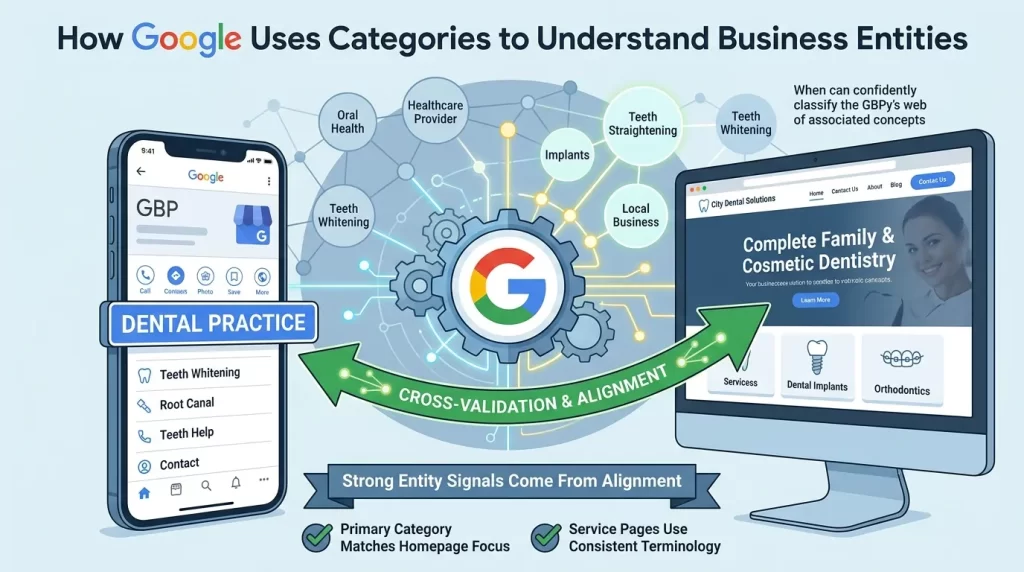
Google doesn’t just read your category as text. It uses it to place your business inside its understanding of entities and relationships.
Your category connects to a web of associated concepts, competitors, and search intents. When that category aligns with your website content, Google gets cross-validation. The classification becomes more credible.
This is where most businesses leave value on the table. Your GBP category says one thing while your website says another. A dental practice listed as “general dentist” on Google but advertising “cosmetic dentistry and implantology” on its site sends mixed signals. Google can’t decide what you actually are.
Strong entity signals come from alignment.
- Your primary category matches your homepage focus.
- Your service pages use the same terminology as your category.
- Your schema markup reinforces the same business type.
That alignment tells Google your classification is trustworthy. Inconsistency does the opposite.
The Category-Service-Website Alignment Framework
Three layers need to agree: your category, your services, and your website. When they conflict, Google hedges. When they align, Google commits. Even with the right category, businesses can struggle to gain visibility if there are underlying profile issues, which is why understanding why a Google Business Profile is not showing up in Maps search is an important part of any GBP optimization strategy.
Here’s how the framework works in practice.
- Category layer. One primary plus one or two tightly related secondaries.
- Service layer. Every specific offering listed in plain language inside the Services section.
- Website layer. Pages, headings, and schema that mirror the category and services.
A commercial painter setup looks like this. Primary category: Commercial Painter. Secondary: Painting. Services: interior painting, exterior painting, industrial coatings, epoxy flooring, cabinet refinishing. Website: a homepage about commercial painting, dedicated service pages, and Local Business schema.
Each layer reinforces the others. That reinforcement is what builds local authority.
How to Find the Best Primary Category Using Competitor Analysis
The fastest way to find the right category is to study who already ranks.
Search your top keyword in Google Maps. Look at the businesses in the top three to five spots. Their primary categories are visible on their profiles, and patterns tend to emerge quickly.
If every top performer uses “Real Estate Agency” while you use “Real Estate Consultant,” that’s worth testing. The market has already shown you what Google rewards.
Google hides secondary categories from public view, but tools fill the gap.
- PlePer’s category tool reveals categories and related options.
- Local Search Grid surfaces competitor category data.
Don’t copy blindly. Look for patterns across multiple competitors, not one outlier. And note what they avoid too. If top performers use two or three focused categories while weaker competitors bloat their profiles with nine, that confirms focus wins.
How to Audit Competitor Categories Correctly
Competitor analysis goes wrong when you analyze the wrong competitors.
Don’t study businesses that happen to be nearby. Study businesses that rank for the searches you want. Proximity skews local results, so a competitor showing up only because they’re next door tells you nothing about category strategy.
Run the audit like this.
- Search your target keyword from your actual service area.
- Record the primary category of the top five ranked profiles.
- Use a category tool to check their secondary categories.
- Note how many total categories each uses.
- Look for the pattern, not the exception.
The goal is not imitation. The goal is evidence. When several strong competitors share a category, you’ve found a signal worth testing.
Primary Category vs Secondary Categories: What Actually Matters Most?
Your primary category does most of the heavy lifting. Secondary categories support it, but they don’t carry equal weight.
You can add up to nine secondaries. That doesn’t mean you should. More categories dilute your relevance instead of expanding it.
Here’s the math that makes it clear. A painter using six categories tells Google it’s roughly 16% painter, 16% contractor, 16% insulation contractor, and so on. A competitor using “Commercial Painter” plus “Painting” reads as 50% painter, 50% painting. 100% focused.
Who ranks higher for “commercial painter”? The focused one. Every time.
Use this test for every secondary category you consider: would you want to be known as a [category] business? If the answer is no, it belongs in your Services section instead.
How Wrong Categories Suppress Google Maps Rankings
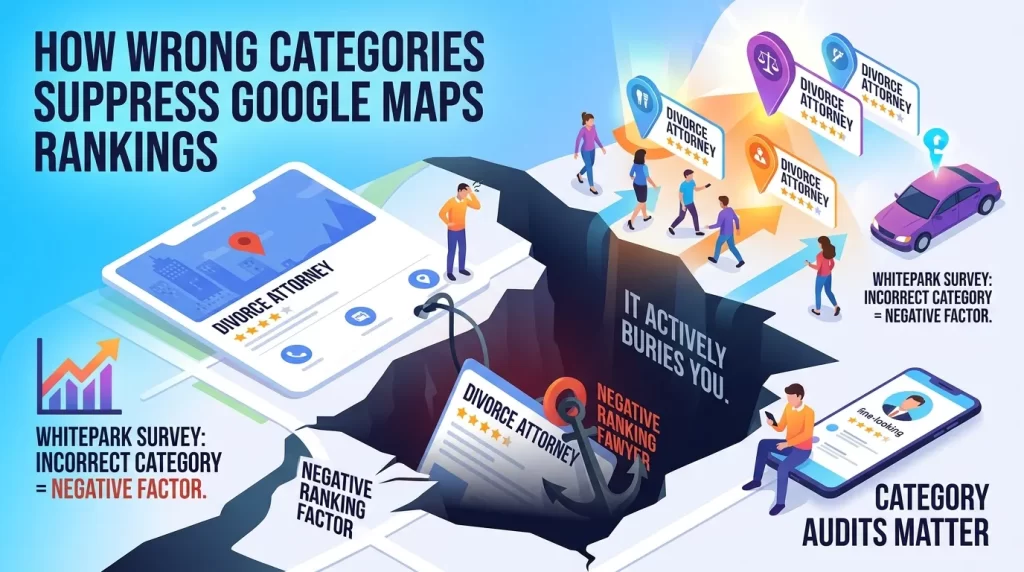
A wrong primary category doesn’t just underperform. It actively buries you.
The Whitespark survey lists an incorrect category as a negative factor. That means it works against your rankings, not just neutral to them. If you’re a divorce attorney listed as “Lawyer,” you’ll struggle to appear for “divorce attorney near me” no matter how good your reviews are.
The damage is quiet. Nothing breaks. Your profile looks fine. You simply stop showing up for your most valuable searches while focused competitors take the traffic.
This is why category audits matter more than most owners realize. You can’t fix a problem you don’t know you have. Before making category changes, it’s important to understand the difference between a Google Business Profile and a Google Maps listing since both play different roles in local search visibility.
How Categories Influence Reviews, Services, and Relevance Signals
Categories don’t operate in isolation. They shape how other signals get interpreted.
When your category, services, and reviews all point in the same direction, Google reads a coherent business. Reviews mentioning “tree removal” reinforce a “Tree Service” category. Services listing “stump grinding” reinforce it again. The signals compound.
Misalignment breaks the loop. A profile categorized as “Landscaper” but earning reviews about emergency tree removal sends scattered signals. Google has to guess which searches you fit.
The fix is consistency across every layer.
- Category matches your core business.
- Services describe what that business delivers.
- Review requests focus on your priority service.
The Hidden Relationship Between Categories and Google’s Knowledge Graph
Your category feeds Google’s Knowledge Graph, the system that maps businesses, concepts, and relationships.
When your GBP category aligns with structured website content, you strengthen your entity profile inside that graph. Google builds a clearer picture of what you are and what you’re connected to. That clarity improves how often and how accurately you surface. Your primary category also plays a major role in determining whether your business can earn visibility in the highly competitive Google Map Pack where most local clicks and leads originate.
Schema markup accelerates this.
- LocalBusiness schema confirms your business type.
- Service schema details what you offer.
- FAQPage schema answers common questions in a machine-readable format.
These signals validate your category from a second source. Google trusts cross-validated entities more than isolated claims. A consistent entity profile is also what feeds accurate data to AI systems.
How Primary Categories Impact Google AI Overviews, ChatGPT, Gemini, Claude, and Perplexity
AI systems don’t invent local recommendations. They pull from structured data, and your category is part of that data.
When someone asks ChatGPT or Gemini for “the best family law attorney in Chicago,” the AI relies on classified business information to answer. A wrong category means the AI files you under the wrong business type. You get left out of the recommendation.
AI recommendation systems weigh three things when selecting local businesses.
- Contextual relevance. Does your category match the query intent?
- Demonstrable uniqueness. Do your attributes set you apart from competitors?
- Validated entity connections. Do your category, website, and reviews agree?
Google’s AI Overviews follow the same logic. The Whitespark survey puts GBP signals at 12% of AI search visibility factors, behind on-page content and reviews but still meaningful. Your category is the entry point. If the classification is wrong, the rest barely matters.
That is why category accuracy now affects more than Google Maps. It shapes whether AI systems recommend you at all.
When You Should Change Your Primary Category
Sometimes the right move is switching your primary category. A few situations justify it.
- Your current category is too broad. “Contractor” when “Roofing Contractor” exists.
- Your demand shifts seasonally. An HVAC company can run “Furnace Repair Service” in winter and “Air Conditioning Contractor” in summer.
- Your most profitable service isn’t your primary. One landscaper switched primary from “Landscaper” to “Tree Service” and saw more Local Pack visibility for high-intent tree searches within weeks.
- Competitor analysis reveals a better-performing category. The top-ranking businesses consistently use a category you don’t.
You’re not locked in. Categories can be updated anytime, and aligning your primary with what you actually want to rank for is one of the highest-leverage changes available.
When You Should NOT Change Your Primary Category
Changing categories carries risk. Don’t do it casually.
- Your current category is already accurate and ranking. Don’t fix what works.
- You’re chasing a trend, not evidence. A single competitor using a different category isn’t proof.
- You’re about to make several changes at once. Bulk category changes can trigger re-verification and temporarily hurt visibility.
- You haven’t checked the impact on profile features. A new category might remove a booking button or menu you rely on.
Major changes can shake your rankings while Google re-indexes your profile. Change with a reason, not a hunch.
GBP Category Testing Framework Used by Local SEO Agencies
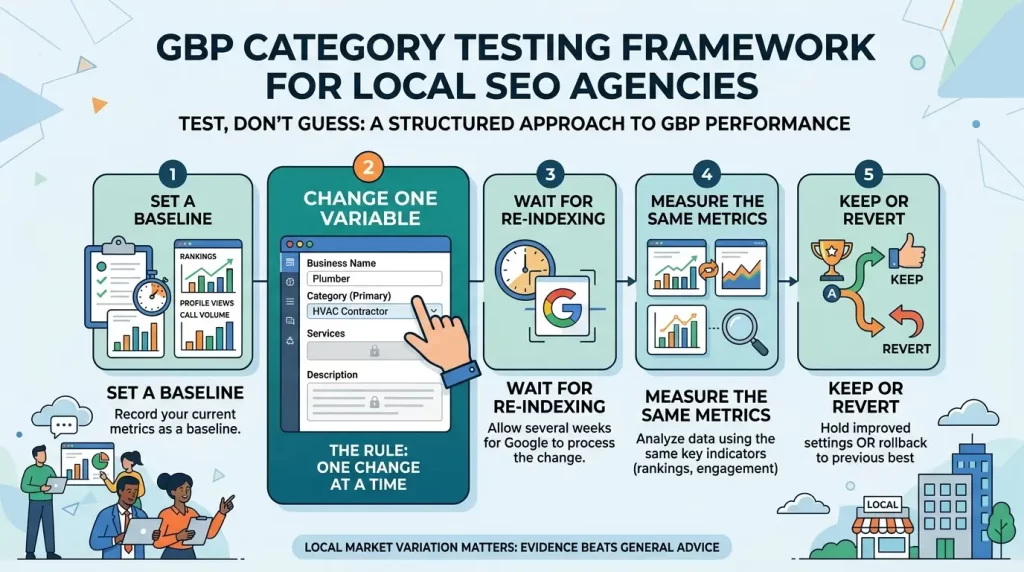
Category selection isn’t always obvious. When two categories seem viable, test instead of guess.
Agencies use a structured approach.
- Set a baseline. Record your current rankings, profile views, and call volume.
- Change one variable. Switch only the primary category, nothing else.
- Wait for re-indexing. Give Google a few weeks to process the change.
- Measure the same metrics. Compare rankings and engagement against your baseline.
- Keep or revert. If the new category improves performance, hold it. If not, roll back.
The rule is one change at a time. Switch your category and your services and your description together, and you won’t know what moved the needle.
Testing also accounts for market variation. A category that wins in one city might lose in another. Evidence from your own profile beats general advice every time.
Primary Category Optimization Checklist
Run through this before finalizing your primary category.
- Chosen the most specific category that accurately describes your core business
- Confirmed the category against top-ranking competitors in Google Maps
- Limited yourself to one primary plus one or two related secondaries
- Moved all extra offerings into the Services section
- Aligned your website homepage and service pages with the category
- Added LocalBusiness, Service, and FAQPage schema
- Verified the category enables the profile features you need
- Set a baseline before making any changes
- Planned a single change, not a batch
Common Category Selection Mistakes
Most category problems trace back to a handful of repeated errors.
- Choosing broad over specific. “Lawyer” instead of “Divorce Attorney” leaves ranking power on the table.
- Adding too many categories. Nine categories dilute relevance instead of expanding reach.
- Confusing categories with services. Listing every offering as a category instead of using the Services section.
- Ignoring competitor data. Guessing your category when the top performers already show you the answer.
- Misaligning website and GBP. Saying one thing on Google and another on your site.
- Changing categories in bulk. Triggering re-verification and tanking visibility while Google re-indexes.
Each mistake sends Google a muddier signal. Clean signals win local search.
FAQs
How many Google Business Profile categories should I use?
Use one primary category plus one or two highly related secondary categories. Google allows up to nine secondaries, but top-ranking businesses typically use one to three focused categories total. More categories dilute your relevance instead of strengthening it.
What’s the difference between a category and a service on Google Business Profile?
A category is what your business fundamentally IS, like “Plumber” or “Family Law Attorney.” A service is what your business DOES, like “drain cleaning” or “child custody cases.” Categories carry significant ranking weight. Services are customer-facing details that don’t rank the same way. List your core identity as a category and everything else as services.
Can I change my primary category later?
Yes. You can update categories anytime, and many businesses change them seasonally. Be aware that major changes can trigger re-verification and temporarily affect rankings while Google re-indexes your profile. Change one thing at a time so you can measure the impact.
What happens if I pick the wrong primary category?
A wrong primary category acts as a negative ranking factor. It can suppress your visibility for the searches that matter most. A divorce attorney listed as “Lawyer” will struggle to appear for “divorce attorney near me” regardless of review count or website quality.
How do I see what categories my competitors use?
Google shows primary categories publicly on each profile. Secondary categories are hidden, but tools like PlePer’s category tool and Local Search Grid reveal them. Search your target keyword in Google Maps, then check the top-ranked profiles for category patterns.
Final Thoughts
Your primary category is not a formality. It’s the foundation Google uses to classify your business, decide your rankings, and feed accurate data to AI systems.
Get it specific. Match it to what you want to rank for. Confirm it against competitors who already win. Then align your services, website, and schema so every signal points the same direction.
The businesses that dominate local search aren’t trying to be everything. They pick one clear identity and reinforce it everywhere. That focus is what Google rewards, and now it’s what AI systems reward too.
Start with an audit. Search your top keyword, check your category against the top performers, and fix any gaps you find. One accurate category change can move you from invisible to found.
If you’re unsure whether your current category is helping or hurting your rankings, contact us for professional Google Business Profile optimization services and get expert guidance tailored to your business.

Arbaz Shaukat is a Local SEO Expert who helps websites generate more leads, traffic, and sales from Google and AI-driven search platforms like ChatGPT through proven SEO strategies. He is the Founder of GBP Optimization Services, where he works closely with businesses to improve their online visibility on the internet.
Since 2020, Arbaz has been active in SEO and loves to share experience-based blog content offering practical insights, tested SEO techniques, and real-world strategies that help businesses grow and compete effectively online.