How to Reinstate a Suspended Google Business Profile, Step by Step
Seven clear steps to recover a suspended profile, from diagnosis to a strong appeal.
- Diagnose before you appeal. Most failed appeals fix the wrong thing.
- Correct every guideline issue first, then appeal once with consistent information.
- Evidence must match the business name and address on the profile exactly.
- Keep the original profile. A new one is usually treated as a duplicate.
Getting a suspended Google Business Profile back is mostly about preparation. Appeals fail when they’re rushed, when the original problem is still on the profile, or when the evidence doesn’t match. This guide walks through the process we follow, step by step.
If you’re not sure why you were suspended, start with our guide on why Google Business Profiles get suspended.
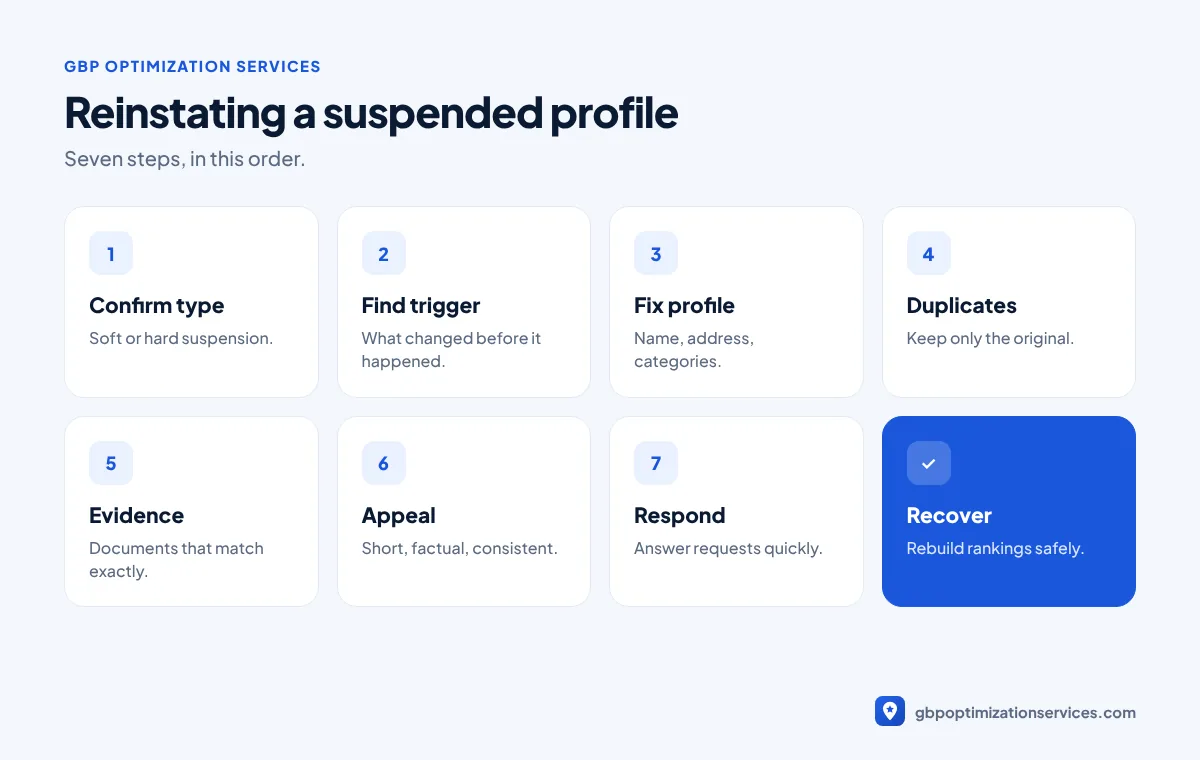
Step 1: Confirm the type of suspension
Search for your business on Google and Maps while logged out.
- Still visible but you can’t manage it: usually a soft suspension.
- Not visible at all: usually a hard suspension, where the listing is removed.
Check your email and the Business Profile dashboard for any notice from Google, and note the date it arrived.
Step 2: Find the likely trigger
List everything that changed in the weeks before the suspension: name edits, address changes, new managers, new profiles, review campaigns. Then compare against the common triggers:
| Trigger | What to check |
|---|---|
| Business name | Does it match your signage and registration exactly? |
| Address | Is it a real, staffed location, or should it be hidden as a service area? |
| Duplicates | Is there another profile for the same business? |
| Category | Is it a high-risk category with stricter review? |
| Account | Is any manager linked to other suspended profiles? |
| Reviews | Were rewards ever offered for reviews? |
Step 3: Fix the profile before appealing
This is the step most people skip. If the trigger is still there, the appeal will usually be denied.
- Change the name to your exact real-world business name.
- Remove an ineligible address, or switch to a service-area setup.
- Correct categories, hours, phone number and website.
- Remove managers you don’t recognize or no longer work with.
Step 4: Deal with duplicates
If you created a new profile after the suspension, or find old duplicates, don’t keep them running alongside the original. Duplicates confuse Google’s systems and are a common reason appeals fail. Focus on recovering the original listing, which holds your reviews.
Step 5: Prepare your evidence
Google wants proof that the business is real and operates where it says.
| Evidence | Tip |
|---|---|
| Business registration or licence | Name must match the profile exactly |
| Utility bill or bank statement | Recent, showing name and address |
| Signage photos | Permanent signage, clearly readable |
| Storefront and interior photos | Show the business operating |
| Vehicles or equipment | Useful for service-area businesses |
| Verification video | Location, business and proof you manage it |
Recent changes to appeals let you upload supporting evidence after submitting. Prepare everything in advance, because the evidence form must be completed within a set time window.

Get a free Google Business Profile audit, reviewed personally by Arbaz. Usually within 24 hours.
Step 6: Submit the appeal
Use Google’s official appeals process from your Business Profile. Keep your explanation short and factual: what the business is, where it operates, and what you corrected. Make sure every detail matches your evidence and the profile.
Step 7: Wait, then respond quickly
Review times vary from days to weeks. If Google asks for more information or a verification video, respond quickly and consistently. Don’t submit repeated appeals while one is under review.
If the appeal is denied
A denial usually means the evidence or profile data didn’t satisfy Google. Go back to steps 2 and 5: look for a cause you missed, and check every document for mismatches. A second appeal with the same information rarely succeeds.
A sample appeal explanation
Keep the written part of your appeal short and factual. For example:
Rapid Flow Plumbing is a licensed plumbing company serving Austin, Texas since 2015. We are a service-area business and have now hidden our address and listed the areas we serve. Our business name has been corrected to match our registration and signage. Attached are our business registration, plumbing licence, a recent utility bill and photos of our branded vans.
Avoid emotional language, long histories or blaming Google. The reviewer wants facts that match the evidence.
Reinstatement checklist
| Item | Done? |
|---|---|
| Suspension type confirmed | |
| Likely trigger identified | |
| Business name matches registration | |
| Address eligible or hidden | |
| Categories accurate | |
| Duplicates handled | |
| Unknown managers removed | |
| Evidence collected and matching | |
| Video ready if requested | |
| Appeal submitted once |
Print or copy this list and tick each item before you submit. Most denials we review are missing at least one of these.
After reinstatement
Once the profile is back:
- Check that your reviews, photos and details have returned correctly.
- Make any remaining non-urgent edits slowly, one at a time.
- Keep the profile active with posts and photos.
- Rebuild rankings with safe optimization.
Our suspension reinstatement service handles every step above, starting with a free case review. We’ll tell you honestly whether recovery is realistic before any work begins.
Frequently asked questions
It varies. Some appeals are reviewed within days, others take weeks, especially when more evidence is requested.
Service-area businesses can still be reinstated. Hide the address, set your service area, and use evidence such as registration, branded vehicles and equipment.
No. Recovering the original keeps your reviews. Deleting it and starting again usually makes things worse.
Yes, if they’re a manager on the profile. You’ll still need to provide the evidence and possibly a verification video.
A short, factual explanation of what the business is, where it operates and what you corrected, matching your evidence.
Often they recover over time, especially when the profile is kept active and optimized safely.
Arbaz Shaukat
Arbaz has spent more than 7 years ranking local businesses on Google Maps, and now in AI search. He built and refined his own Google Business Profile strategies across industries such as home services, transport and healthcare, and personally plans every client project. Results from his work include 54 to 686 Google clicks in three months and a 150% increase in calls for a private taxi service.
Ready to be the business customers pick first?
Get a free GBP audit, reviewed personally, usually within 24 hours.