Best Photo Size and Dimensions for Google Business Profile in 2026
For Google Business Profile photo size, Google currently recommends 720 × 720 pixels, with a minimum resolution of 250 × 250 pixels. Photos should be JPG or PNG and between 10 KB and 5 MB. They should also be clear, well lit, in focus, and accurately represent the business.
Following the recommended Google Business Profile photo dimensions can help ensure your images display properly across Google Search and Maps.
Those are Google’s general Business Profile photo guidelines. But the best photo is not simply the biggest file you can upload. The best photo is sharp, bright, honest, and useful to a customer trying to decide whether to call you. That is what this guide is all about. add key words in this paragraph Best Photo Size and Dimensions for Google Business Profile in 2026
Below, you’ll find exactly what Google says, what it means, and what a local business should actually do with photos in 2026.
What Is the Best Photo Size for Google Business Profile in 2026?
The best photo size for Google Business Profile is 720 × 720 pixels, which is Google’s recommended resolution. Here’s the full breakdown straight from Google’s official guidance.
| Photo requirement | Google recommendation |
|---|---|
| Recommended resolution | 720 × 720 pixels |
| Minimum resolution | 250 × 250 pixels |
| File formats | JPG or PNG |
| File size | 10 KB to 5 MB |
| Quality | Clear, well lit, in focus, and realistic |
These are Google’s current published photo guidelines. You can read them directly in Google’s Business Profile photos and videos documentation. Any photo you upload should meet these standards before it goes live.
One quick note on quality. Google specifically says your image should be in focus, well lit, and free of significant alterations or excessive filters. In plain terms: the photo should look like real life. This matters more than most people realize, so we’ll come back to it.
Image recommendation 1
- Filename: google-business-profile-photo-size-requirements-2026.png
- Alt text: Google Business Profile photo size and resolution requirements
- Image title: Google Business Profile Photo Size Requirements 2026
- Caption: Google’s recommended photo standards for Business Profile images in 2026.
- Placement: Directly after the table above.
Does Google Require 720 × 720 for Every GBP Photo?
No. The 720 × 720 figure is Google’s recommended resolution, not a rule that every image must be a perfect square.
Here’s the practical reality. Your business will have many kinds of photos. Wide exterior shots. Tall product photos. Group team photos. Google can display these differently depending on the page, the device, and the layout. So you don’t need to force every single image into a 720 × 720 square.
What you should do is keep the important part of the photo away from the extreme edges. Google may crop images to fit different spaces, and a subject jammed against the edge can get cut off. More on that in the cropping section below.
What File Size and Format Should GBP Photos Use?
Google accepts JPG or PNG files between 10 KB and 5 MB. That range gives you plenty of room, but each format has a best use.
- JPG works great for regular photos. Storefronts, food, team shots, and completed work all compress nicely as JPG while keeping the file size reasonable.
- PNG works well for graphics with sharp edges or transparency, such as a logo or a simple design element.
PNG is not automatically “better.” A PNG photo of your restaurant can be much larger than the same image saved as JPG, with no visible quality gain. The goal is a clear image that meets Google’s requirements without a bloated file size. If your photo looks sharp and lands comfortably inside the 10 KB to 5 MB range, you’re good.
What Size Should a Google Business Profile Logo Be?
Your logo helps customers recognize your business, and Google highlights it once your profile has core details like your name, hours, and phone number filled in.
Here’s an important distinction that trips up a lot of business owners. You may have seen logo specs that read like this:
- Minimum 500 × 500 pixels
- Maximum 2000 × 2000 pixels
- 1:1 ratio
- BMP, JPEG, or PNG
- Maximum 5 MB
Those specs come from Google’s Brand Profile logo documentation, which relates to your brand profile shown on Google Search and Merchant Center. That is not the same thing as the ordinary Google Business Profile photo guidance, which lists JPG or PNG and the 250 × 250 to 720 × 720 range.
So please don’t treat the Brand Profile logo page as a universal GBP photo rule. When you add a logo to your Business Profile, follow the standard Business Profile photo guidelines: JPG or PNG, well within the file size range, and a clean square image that reads well at small sizes. For clarity and safe cropping, a square logo with a little breathing room around the mark is your best bet.
What Size Should a Google Business Profile Cover Photo Be?
The cover photo is a specific Business Profile photo type that sits at the top of your profile. Google recommends choosing an image that best represents your business and meets its general photo standards.
Here’s the part where accuracy matters. Google does not publish one mandatory cover photo dimension in its Business Profile photo guidelines. You may have seen sizes like 1332 × 750 pixels floating around SEO blogs. That’s a common practical recommendation from practitioners, not an official Google requirement.
Google is also clear on something else. Setting a cover photo doesn’t guarantee it shows up first. If your chosen image is low quality, Google may display a different photo instead. Cover photos can also appear differently across mobile, desktop, and various layouts.
The practitioner takeaway: pick a strong, high quality horizontal image that still looks good when cropped, and keep the main subject centered. Don’t obsess over hitting one exact pixel count that Google never actually mandated.
Best Photo Dimensions for Different Google Business Profile Photo Types
Google publishes general photo guidelines rather than separate official dimensions for each category. So the table below pairs Google’s general standard with practical composition advice we use when working on local profiles.
| Photo type | Recommended approach | Purpose | Composition tip |
|---|---|---|---|
| Logo | Square, JPG or PNG, meets general photo specs | Brand recognition | Keep the mark centered with light spacing |
| Cover photo | High quality horizontal image, general specs | First impression | Center the subject; expect cropping |
| Exterior | Follow general photo specs | Help customers find you | Show signage and the entrance clearly |
| Interior | Follow general photo specs | Set expectations | Bright, tidy, real spaces |
| At work | Follow general photo specs | Show you in action | Capture real staff doing real work |
| Product | Follow general photo specs | Aid buying decisions | Clean background, sharp focus |
| Service | Follow general photo specs | Show results | Before and after where it makes sense |
| Team | Follow general photo specs | Build trust | Natural light, friendly faces |
Where Google only gives general photo requirements, we’ve said so. Nobody should invent official dimensions that don’t exist.
Image recommendation 2
- Filename: google-business-profile-photo-types-guide.png
- Alt text: Types of photos to upload to Google Business Profile
- Image title: Google Business Profile Photo Types
- Caption: Examples of exterior, interior, at-work, product, and team photos for a local Business Profile.
- Placement: Directly after the photo types table.
What Is the Best Aspect Ratio for Google Business Profile Photos?
There is no single magic aspect ratio you must follow. Google recommends 720 × 720 as a resolution, but it doesn’t force one universal ratio on every image.
Instead of chasing a perfect ratio, focus on these five things:
- Place the main subject near the center.
- Avoid large areas of empty space.
- Keep important details away from the edges.
- Start with a high quality source image.
- Check how the photo looks after you upload it.
That last step is the one people skip. Upload the image, then view your profile on both a phone and a computer to make sure nothing important got cut off.
Why Does Google Crop My Business Profile Photos?
Google crops photos because it displays them in many different containers across Search and Maps, and those spaces aren’t all the same shape.
Common reasons your photo looks cropped:
- Different layouts on mobile versus desktop.
- Cover photo placement at the top of your profile.
- Automatic image processing.
- Various image containers on Search and Maps.
- The main subject sitting too close to an edge.
The fix is simple. Compose your shots so the key subject sits comfortably inside the frame. Don’t rely on tiny text at the corners. Choose photos that still tell the story even if the top, bottom, or sides get trimmed.
Image recommendation 3
- Filename: google-business-profile-photo-composition-cropping.png
- Alt text: Google Business Profile photo composition and cropping example
- Image title: How to Compose Google Business Profile Photos
- Caption: A side-by-side look at poor composition versus a photo positioned safely for cropping.
- Placement: Within this cropping section.
Should You Upload 1080 × 1080 Photos to Google Business Profile?
You can, as long as the image meets Google’s file and quality requirements. But 1080 × 1080 is not a Google requirement.
1080 × 1080 is a popular social media size, so many businesses already have images at that resolution. Google recommends 720 × 720 for Business Profile photos, and a 1080 × 1080 image sits above that while staying under the 5 MB limit in most cases. So if you already have a sharp, well lit 1080 × 1080 photo, feel free to use it. Just don’t believe anyone who tells you 1080 × 1080 is “the required size.” It isn’t.
Does Photo Size Affect Google Maps Rankings?
No. Photo dimensions are not a confirmed direct Google Maps ranking factor. Don’t let anyone sell you on “720 × 720 photos will make you rank higher,” because that claim has no official basis.
So why do photos matter at all? Because they shape how customers experience your profile:
- They build visual trust before someone ever calls.
- They help customers understand your location, products, and service.
- They give people reasons to choose you over a competitor.
- They make your profile feel complete and active.
Strong photos can improve how customers perceive and interact with your business. Correct dimensions simply make sure your media meets Google’s requirements and displays well. Photos are one part of a complete profile strategy, not a ranking shortcut. If you want the bigger picture on how listings differ and where visibility comes from, this breakdown of Google Maps SEO is a helpful next read.
How Many Photos Should You Upload to Google Business Profile?
Google doesn’t publish a strict minimum number of photos you must upload. Instead, Google encourages you to add photos across meaningful categories so customers get a full picture of your business.
Focus on covering these areas well:
- Exterior
- Interior
- At work
- Products
- Team
The goal is enough authentic visual information for a customer to understand your business at a glance. Never pad your photo count with blurry, dark, or duplicate images just to hit a number. Ten honest, high quality photos beat fifty throwaway ones every time.
What Types of Photos Should Local Businesses Upload?
Real photos of your real business always win. Here’s how that plays out across different local industries, with practical examples.
Exterior Photos
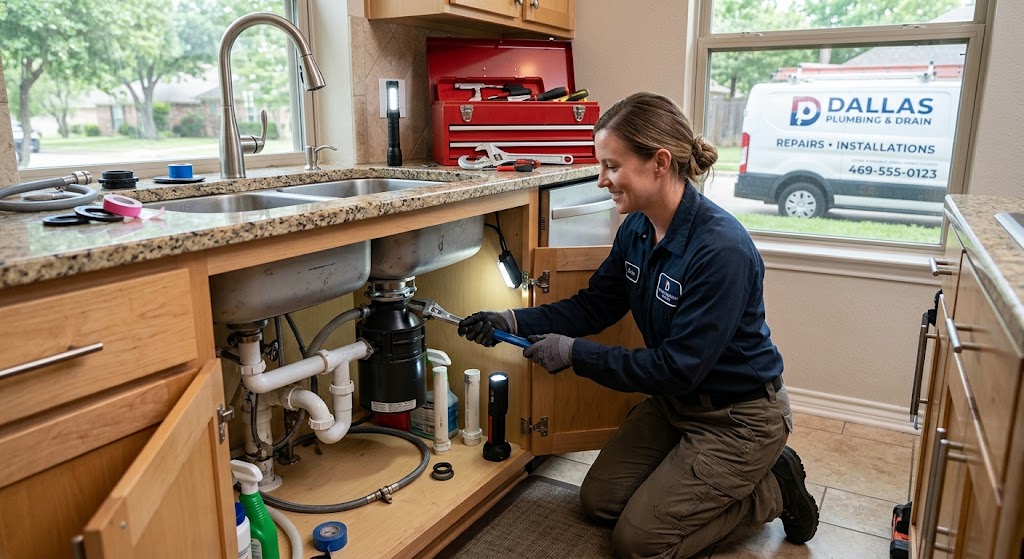
Show the actual building, entrance, signage, and the approach from the street. A plumber’s van parked outside the shop or a restaurant’s storefront at dusk helps customers recognize you when they arrive.
Interior Photos
Show the space customers will actually experience. A restaurant should show the real dining room and atmosphere. A dentist should show the clean, welcoming clinic and treatment area where appropriate.
At Work Photos
Show your team delivering the service. A plumber can share genuine completed repairs. A chauffeur or taxi company can show professional drivers with their actual vehicles, clean and ready for service.
Product Photos
Show real products, not generic stock images. A restaurant should photograph its actual dishes. A retailer should show real items on real shelves.
Team Photos
Show real team members where appropriate. Friendly, natural faces build trust fast, especially for services that involve entering someone’s home.
Service Photos
Show genuine examples of your work. Before and after shots work beautifully for plumbers, cleaners, and contractors, because they let customers picture the result they’ll get.
Every one of these photo types helps a customer make a decision. That’s the whole point.
How to Take Better Google Business Profile Photos
Great GBP photos don’t require a professional camera. They require attention to a few basics.
- Use natural light whenever possible.
- Keep backgrounds clean and uncluttered.
- Make sure the image is sharp and in focus.
- Watch your exposure so the shot isn’t too dark or blown out.
- Photograph real locations, real people, and real products.
- Skip heavy filters and artificial looking edits.
- Shoot from angles a customer would actually find useful.
- Avoid piling text on top of the image.
A simple, well lit photo of your real work will always outperform a fancy stock image that has nothing to do with your business.
Can You Use AI Generated Images on Google Business Profile?
Be very careful here. Google’s guidance says photos should be in focus, well lit, and free of significant alterations or excessive filters, and that the image should represent reality. You can review Google’s photos and videos policy for the full picture.
That doesn’t mean every AI assisted edit is automatically banned. But the safest, smartest approach is simple: use authentic images that accurately represent your real business.
Do not replace a real storefront, team, product, or service with a misleading AI generated version. Never create fake locations, fake employees, fake customers, or fake results. Honesty protects both your trust with customers and your compliance with Google’s policies.
Common Google Business Profile Photo Mistakes
One mistake we commonly see is business owners treating photos as an afterthought. Here are the errors worth avoiding, and why each one matters.
- Blurry images make your business look careless.
- Very small images below the 250 × 250 minimum may not display well or get accepted.
- Oversized files above the 5 MB limit won’t upload.
- Unrelated stock images confuse and mislead customers.
- Misleading AI images break trust and risk policy issues.
- Overused filters hide what your business really looks like.
- Dark photos make spaces feel uninviting.
- Cropped subjects cut off the very thing you’re trying to show.
- Too much text on an image looks cluttered and can get trimmed.
- The same photo repeated adds nothing for customers.
- Outdated photos set wrong expectations if your business has changed.
- Ignoring exterior and interior shots leaves customers guessing.
Fix these, and your profile instantly looks more professional and trustworthy.
How to Optimize a GBP Photo Before Uploading
Here’s a simple, repeatable workflow we follow before any photo goes live.
- Choose a genuine photo of your business.
- Crop it carefully so the main subject sits comfortably in the frame.
- Resize it appropriately, keeping 720 × 720 in mind for general photos.
- Compress it so the file size drops without wrecking the quality.
- Confirm the file is JPG or PNG.
- Check that the file size lands between 10 KB and 5 MB.
- Make sure the image is sharp and well lit.
- Confirm it accurately represents your business.
- Upload it to the correct photo category.
Follow these nine steps and your photos will meet Google’s requirements while actually looking good.
Should You Add Keywords to GBP Photo File Names?
Descriptive file names help you organize your photo assets, but they are not a guaranteed Google Maps ranking tactic. Don’t expect a filename to move your rankings.
Avoid spammy, stuffed names like:
Prefer clean, descriptive names like:

Think of descriptive file names as an organization and accessibility habit, not a ranking hack. It keeps your media library tidy and gives helpful context, and that’s the honest benefit.
Should You Add Geotags or EXIF Data to GBP Photos?
Be cautious with EXIF and geotagging advice. Adding GPS metadata is not a confirmed ranking factor, so no one should promise it will lift your Maps rankings.
You’ll see plenty of Local SEO articles talk about EXIF data. It’s fine to have accurate metadata, but treat it as a minor detail, not a strategy. Your energy is far better spent on:
- Authentic, high quality photos.
- Relevant images across every category.
- Correct and complete Business Profile information.
- Strong local SEO fundamentals.
How Photo Optimization Fits Into Google Business Profile SEO
Photos are one piece of a much larger puzzle. A complete Google Business Profile optimization strategy pulls together many signals that work together.
- The correct primary category.
- Relevant secondary categories.
- A clear business description.
- Accurate services.
- Genuine reviews and thoughtful responses.
- Well defined service areas.
- Complete and correct business information.
- A relevant, connected website.
- Local content and citations.
- Ongoing local authority.
Photos support how customers perceive you, but they can’t fix ranking problems on their own. If you serve customers across multiple locations, pairing strong photos with properly set up service areas makes a real difference in how the right people find you. And if clicks are your goal, these tips on local SEO services pair perfectly with a photo-rich profile.
Recommended GBP Photo Checklist for 2026
Keep this handy before every upload.
- JPG or PNG format.
- File size between 10 KB and 5 MB.
- 720 × 720 recommended for general Business Profile photos.
- At least 250 × 250 minimum resolution.
- Clear and sharp.
- Well lit.
- Realistic and honest.
- Relevant to your business.
- No excessive filters.
- No misleading AI imagery.
- Important subjects kept away from the edges.
- A variety of genuine business photos across categories.
Get a Free GBP Audit
If your Google Business Profile has the right information but still isn’t generating the visibility or enquiries you expect, the problem may involve more than photos. A complete GBP audit can identify issues with categories, services, reviews, local relevance, and Maps optimization, so you know exactly what to fix next.
Get a Free GBP Audit and see where your profile stands today.
Frequently Asked Questions
What is the best photo size for Google Business Profile in 2026?
Google recommends 720 × 720 pixels for Business Profile photos, with a minimum of 250 × 250 pixels. Use JPG or PNG files between 10 KB and 5 MB that are clear, well lit, and realistic.
Is 720 × 720 the recommended Google Business Profile photo size?
Yes. 720 × 720 pixels is Google’s recommended resolution for Business Profile photos. It’s a recommendation, not a rule that forces every image into a square.
What is the minimum photo size for Google Business Profile?
The minimum resolution is 250 × 250 pixels. Images below that may not display well or meet Google’s requirements.
What file format does Google Business Profile use?
Google Business Profile accepts JPG or PNG files. JPG suits regular photos, while PNG works well for graphics and logos.
What is the maximum GBP photo file size?
The maximum file size is 5 MB, and the minimum is 10 KB. Aim for a sharp image that stays comfortably inside that range.
What size should a Google Business Profile logo be?
For a logo added to your Business Profile, follow the general photo guidelines: JPG or PNG, a clean square image, within the standard file size range. Note that the separate Brand Profile logo specs (500 × 500 minimum, 2000 × 2000 maximum, 1:1 ratio) apply to your brand profile on Search, not to ordinary Business Profile photos.
What size should a Google Business Profile cover photo be?
Google doesn’t publish one mandatory cover photo dimension. Choose a high quality horizontal image that meets Google’s general standards and looks good when cropped. Sizes like 1332 × 750 are practitioner recommendations, not official Google rules.
Can I upload 1080 × 1080 photos to Google Business Profile?
Yes, as long as the image is JPG or PNG, stays under 5 MB, and looks sharp. Just remember that 720 × 720 is Google’s recommended size, and 1080 × 1080 is not required.
Does photo size affect Google Maps rankings?
No. Photo dimensions are not a confirmed direct ranking factor. Great photos improve customer trust and engagement, which supports your overall profile, but the pixel count itself isn’t a ranking hack.
Why does Google crop my Business Profile photos?
Google displays photos in different containers across Search and Maps, and layouts vary by device. Keep your main subject centered and away from the edges so cropping doesn’t cut off anything important.
Can I use AI generated photos on Google Business Profile?
Google’s guidance says images should represent reality and avoid significant alterations. The safest approach is to use authentic photos of your real business and never replace real storefronts, teams, products, or results with misleading AI images.

Arbaz Shaukat is a Local SEO Expert who helps websites generate more leads, traffic, and sales from Google and AI-driven search platforms like ChatGPT through proven SEO strategies. He is the Founder of GBP Optimization Services, where he works closely with businesses to improve their online visibility on the internet.
Since 2020, Arbaz has been active in SEO and loves to share experience-based blog content offering practical insights, tested SEO techniques, and real-world strategies that help businesses grow and compete effectively online.