Why Was My Google Business Profile Suspended? Common Causes and Fixes
The most common reasons Google suspends business profiles, and what to fix before you appeal.
- Most suspensions have a clear trigger: the business name, the address, duplicate listings, risky edits or the industry.
- A soft suspension removes your control. A hard suspension removes the listing from Google.
- Fix the cause before appealing. An appeal with the same problems in place is easy for Google to deny.
- Don’t create a new profile. It is usually treated as a duplicate and makes recovery harder.
A suspended Google Business Profile can cut your calls overnight. Customers searching for you suddenly see competitors instead. The good news is that most suspensions have a clear cause, and many can be fixed.
Google rarely tells you the exact reason. This guide covers the triggers we see most often, how to tell which type of suspension you have, and what to fix before you appeal.
Soft suspension vs hard suspension
There are two main types, and the right response depends on which one you have.
| Soft suspension | Hard suspension | |
|---|---|---|
| Listing visible on Google? | Usually yes | No, removed from Search and Maps |
| Can you manage the profile? | No, often shows as unverified | No |
| Reviews visible? | Usually yes | No |
| Typical cause | Ownership or verification issue | Business or listing seen as ineligible |
| Next step | Fix issues, then appeal | Fix issues, gather strong evidence, then appeal |
The most common causes of a suspension
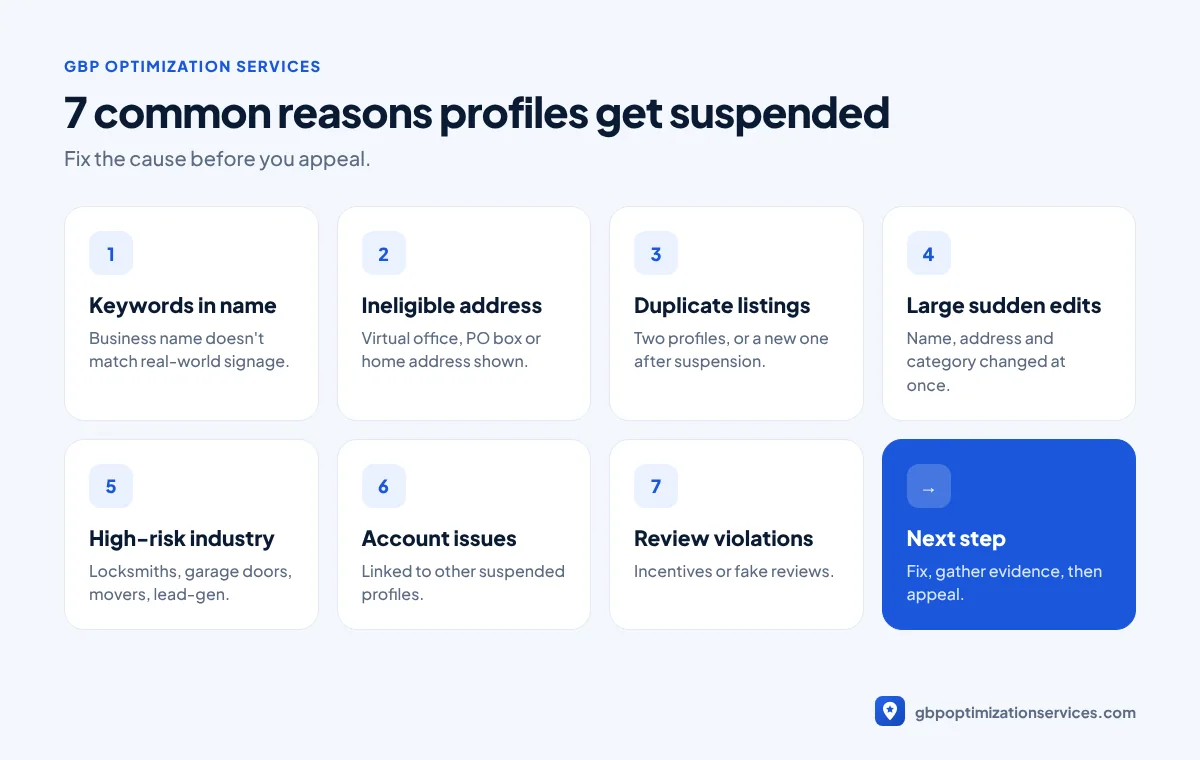
1. Keywords in the business name
Google’s guidelines say your name should reflect your real-world business name, as used on signage and stationery (Google guidelines). “Joe’s Plumbing | 24/7 Emergency Plumber Austin” is a classic example of a name that gets flagged.
2. An ineligible address
Virtual offices, PO boxes, mailbox services and coworking desks are not eligible unless the location is staffed during business hours. Service businesses that show a home address instead of setting a service area are also at risk.
3. Duplicate or competing listings
Two profiles for the same business, or a new profile created after the first was suspended, confuse Google’s systems. Duplicates are one of the most common reasons appeals fail.
4. Sudden or large edits
Changing the name, address, category and website at the same time can look suspicious. Large edits often trigger re-verification or a suspension.
5. High-risk industries
Some categories attract a lot of spam, so Google reviews them more strictly. Locksmiths, garage door repair, movers and lead-generation businesses are common examples. If you work in one of these, read our guide for locksmiths or garage door companies.
6. Account and ownership problems
A manager or owner account linked to other suspended profiles, or unusual login activity, can affect every profile on that account.
7. Review policy violations
Offering discounts or gifts for reviews, or buying reviews, can lead to restrictions such as blocked new reviews or a public warning on your profile.

Get a free Google Business Profile audit, reviewed personally by Arbaz. Usually within 24 hours.
How to work out what triggered your suspension
Start by looking at what changed shortly before the suspension. The timing usually points to the cause.
| What happened recently | Likely trigger |
|---|---|
| You edited the business name | Name doesn’t match real-world signage |
| You moved, or changed the address | Address eligibility or re-verification |
| You created a second profile | Duplicate listing |
| You added a new manager or agency | Account linked to other suspended profiles |
| You ran a review campaign with rewards | Review policy violation |
| Nothing changed at all | Automated review of a high-risk category, or old data conflicts |
If nothing changed, look for older problems: a keyword in the name added years ago, an old address still showing in directories, or a duplicate listing someone else created.
What to do before you appeal
An appeal is a request for a human or automated review of your case. Sending one with the same problems still in place usually ends in a denial, and each denial makes the next attempt harder.
- Identify the likely trigger using the list above.
- Fix the profile first. Correct the name, address or service area, categories and hours.
- Remove or report duplicates instead of creating another listing.
- Collect evidence. Typical documents include business registration, a licence, a utility bill showing the business name and address, and photos of permanent signage and your storefront.
- Prepare for video verification. Google often asks for a short video showing your location, your business and proof that you manage it.
- Submit the appeal through Google’s official process with consistent information.
Evidence that strengthens an appeal
| Document | Why it helps |
|---|---|
| Business registration or licence | Proves the business exists under that name |
| Utility bill or bank statement | Confirms the business name at the address |
| Photos of permanent signage | Shows the business really operates there |
| Storefront and interior photos | Proves customers can visit (storefront businesses) |
| Branded vehicles or equipment | Supports service-area businesses without a storefront |
| Verification video | Shows the location and that you manage it |
Make sure every document shows the same business name and address as the profile. Mismatches are one of the most common reasons good appeals fail.
How long does reinstatement take?
There is no fixed timeline. Some appeals are reviewed within days, others take weeks, especially when Google asks for more evidence. A clean, consistent appeal avoids the back-and-forth that causes most delays.
How to prevent another suspension
Once you’re reinstated, protect the profile:
- Keep the business name exactly as it appears on your signage.
- Make important edits one at a time, and avoid changing several key details at once.
- Remove or merge duplicate listings as soon as you find them.
- Review who has manager access and remove anyone you don’t work with any more.
- Ask for reviews the compliant way, with no incentives. Our guide on getting more Google reviews explains how.
- Keep the profile active with regular posts and photos, so it looks like the real, operating business it is.
When to get help
If your appeal has already been denied, or you can’t identify the cause, a second opinion helps. Our suspension reinstatement service starts with a free case review. We tell you the likely cause and whether recovery is realistic before any work begins.
Frequently asked questions
Google’s systems often act automatically after detecting a policy issue, such as a keyword-stuffed name, an ineligible address or a duplicate listing. The email rarely states the exact reason.
During a hard suspension reviews are hidden along with the listing. When the original profile is reinstated, its reviews normally return.
Yes, but repeated appeals without fixing the cause rarely succeed. Fix the issues and gather evidence first.
If your listing still appears on Google but you can’t manage it, it’s usually soft. If it no longer appears in Search or Maps, it’s hard.
Arbaz Shaukat
Arbaz has spent more than 7 years ranking local businesses on Google Maps, and now in AI search. He built and refined his own Google Business Profile strategies across industries such as home services, transport and healthcare, and personally plans every client project. Results from his work include 54 to 686 Google clicks in three months and a 150% increase in calls for a private taxi service.
Ready to be the business customers pick first?
Get a free GBP audit, reviewed personally, usually within 24 hours.