Service Area vs Storefront Business on Google Business Profile — Which Should You Choose?
A service area business (SAB) travels to customers and hides its address on GBP. A storefront business serves customers at a fixed physical location and displays its address publicly. Choosing the wrong category is one of the most common causes of GBP suspensions and ranking problems.
Many business owners pick the wrong Google Business Profile (GBP) setup without realizing it.
The wrong choice can trigger verification failures, profile suspensions, and reduced visibility in Google Maps.
This guide explains the difference between a service area business and a storefront business, helps you identify which model fits your business, and shows you how to set it up correctly.
What Is a Service Area Business on Google Business Profile?
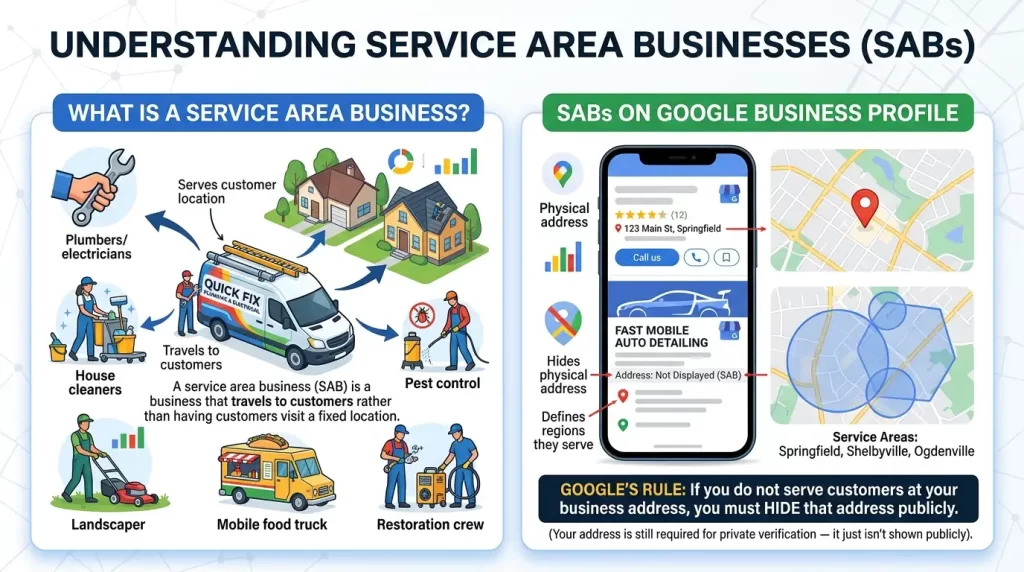
A service area business (SAB) is a business that travels to customers rather than having customers visit a fixed location.
On Google Business Profile, SABs hide their physical address and instead define the regions they serve.
Common examples of service area businesses:
- Plumbers, electricians, and HVAC contractors
- House cleaners and mobile detailers
- Roofers, landscapers, and pest control companies
- Caterers and mobile food services
- Restoration companies (water, fire, mold)
According to Google’s official guidelines, if you do not serve customers at your business address, you should hide that address on your profile.
Your address is still required for verification — it just isn’t shown publicly.
What Is a Storefront Business on Google Business Profile?
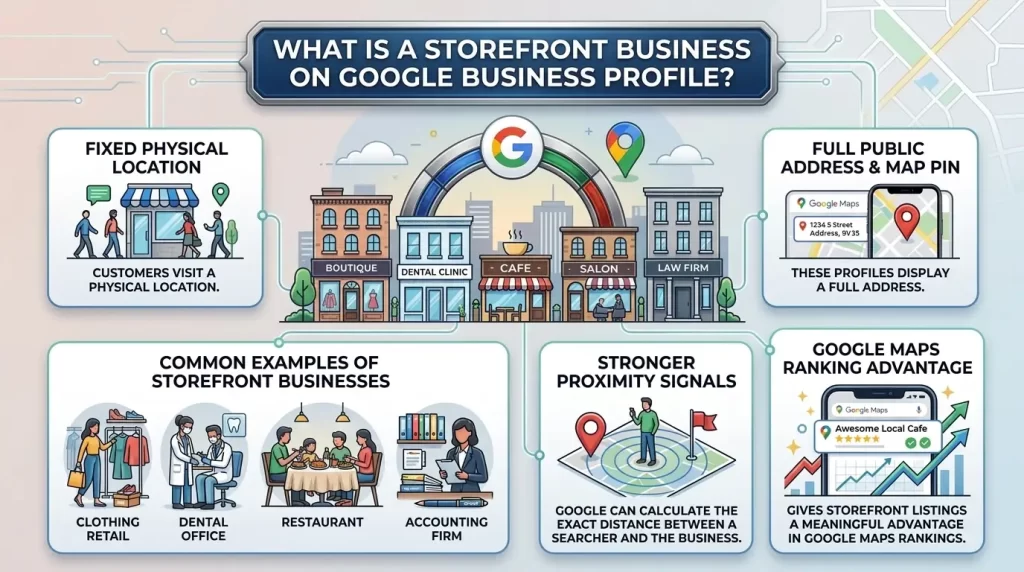
A storefront business is a business where customers visit a fixed, physical location.
These profiles display a full public address and a map pin in Google Maps.
Common examples of storefront businesses:
- Retail stores and boutiques
- Dental offices and medical clinics
- Restaurants and cafés
- Salons, barbershops, and spas
- Law offices and accounting firms
Storefront businesses benefit from stronger proximity signals because Google can calculate the exact distance between a searcher and the business location.
This gives storefront listings a meaningful advantage in Google Maps rankings.
What Is the Difference Between a Service Area Business and a Storefront Business?
The core difference is how and where you serve customers — and that determines how Google displays your profile.
| Feature | Service Area Business (SAB) | Storefront Business |
|---|---|---|
| Address shown publicly | No — hidden from users | Yes — displayed on Maps |
| Map pin in Google Maps | No | Yes |
| Service area defined | Yes — up to 20 regions | Optional |
| Directions CTA available | No | Yes |
| Proximity signal strength | Weaker | Stronger |
| Suspension risk if misconfigured | High (especially home/virtual office) | Lower |
| Verification method | Physical address required (hidden) | Physical address required (shown) |
| Ranking radius | Generally smaller | Generally larger |
Which Businesses Should Choose a Service Area Business Setup?
Choose the SAB setup if you only travel to your customers and do not serve anyone at your business address.
This includes home-based businesses, tradespeople, and any operation where customers never visit your premises.
If you are unsure, ask yourself: “Would a customer ever walk through my business’s front door to receive a service?” If the answer is no, you are an SAB.
After selecting the correct business type, it’s important to choose the right primary category for your Google Business Profile to improve relevance and visibility in local search results.
Which Businesses Should Choose a Storefront Setup?
Choose a storefront setup if customers come to your location to receive goods or services — and your location has permanent signage and staffed business hours.
A dental clinic, retail shop, or restaurant is a storefront business.
These businesses should not define a service area unless they also travel to customers (see hybrid businesses below).
Storefront businesses rank more easily in the Google Local Pack because Google can anchor proximity calculations to a specific map pin.
Can a Business Be Both a Service Area Business and a Storefront Business?
Yes. This is called a hybrid business.
A hybrid business serves customers at a physical location and also travels to customers.
A good example is a restaurant that offers dine-in service and also provides catering or delivery. A plumber with a showroom open to walk-in clients is another.
To qualify as a hybrid business, your physical location must:
- Have permanent, visible signage
- Be staffed during published business hours
- Genuinely welcome customers on-site
Hybrid businesses show their address publicly and define a service area.
Misrepresenting a home-based operation as a hybrid to gain a public map pin is a guideline violation that commonly results in suspension.
Should You Hide Your Address on Google Business Profile?
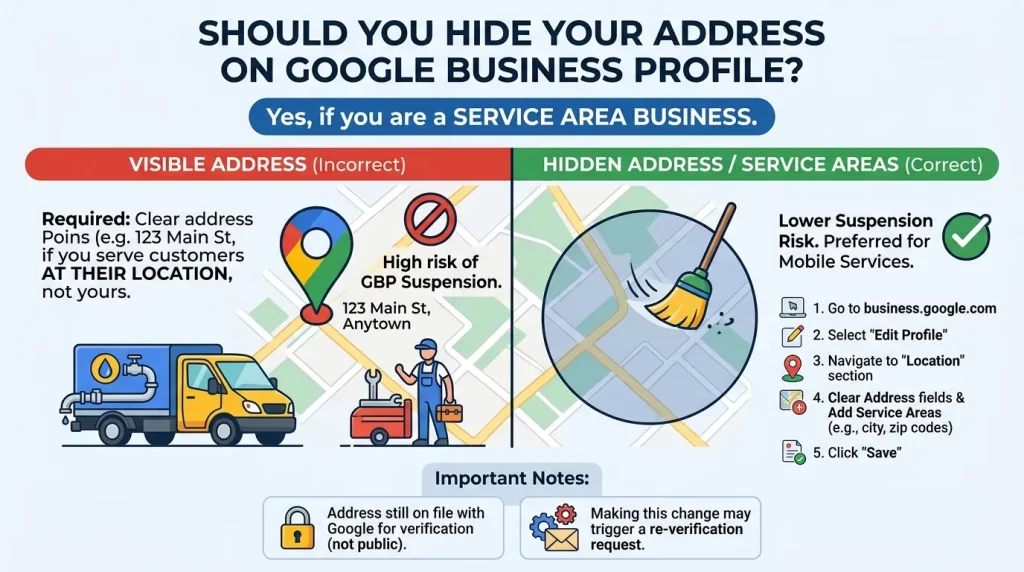
If you are a service area business, yes — you must hide your address. This is not optional.
According to Google’s guidelines, any business that does not serve customers at its address is required to remove that address from its public-facing profile.
Failing to do this is one of the most frequent triggers for GBP suspensions.
Here is how to hide your address:
- Go to your Google Business Profile at business.google.com
- Select Edit Profile
- Navigate to the Location section
- Clear the address fields and add your service areas instead
- Click Save
Your address remains on file with Google for verification — it is simply not shown to the public.
Be aware that making this change can sometimes trigger a re-verification request from Google.
Does Choosing the Wrong Business Type Affect Rankings?
Yes — significantly.
Across GBP optimization campaigns, incorrect business setup often causes more visibility issues than missing attributes or minor profile optimizations.
For SABs incorrectly set up as storefronts:
- Listing a home address or virtual office publicly violates Google’s guidelines
- Google’s systems are designed to detect residential addresses and mail-forwarding centers
- This leads to suspension, removing the profile from Maps entirely
For storefronts incorrectly set up as SABs:
- Hiding a legitimate storefront address removes the proximity anchor
- This weakens the single most important ranking signal for local search
- The business will appear less frequently in the Local Pack despite having a genuine physical location
Google ranks local results based on three factors: relevance, distance (proximity), and prominence.
For SABs, proximity is calculated from the hidden physical address — not from the service areas listed on the profile.
Once your profile setup is complete, optimizing your Google Business Profile attributes can help customers understand your services and improve profile engagement.
What Are the Most Common Service Area Business Mistakes?
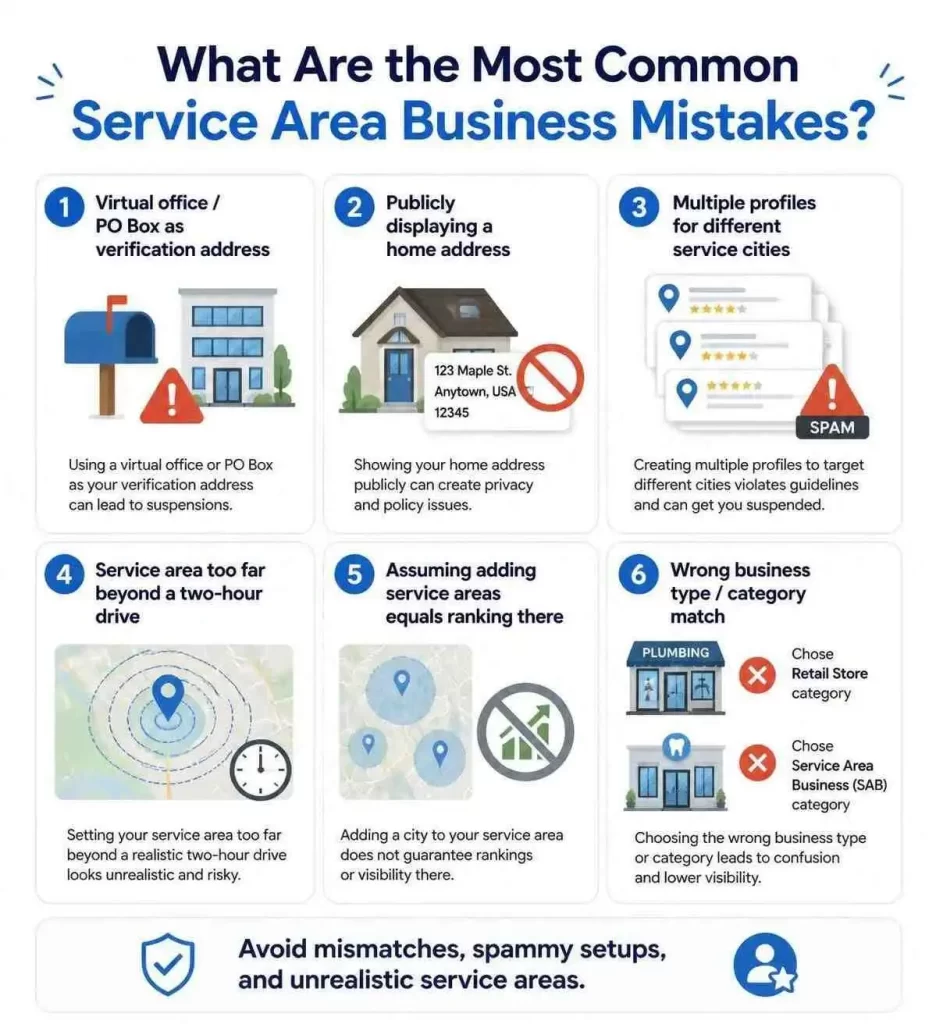
Understanding what goes wrong helps you avoid it.
1. Using a virtual office or PO Box as the verification address
Google explicitly prohibits this. Suspensions from this cause are very difficult to reverse and require extensive documentation.
2. Publicly displaying a home address
Home-based SABs must hide their address. Once suspended, reinstatement can take one to three weeks and requires proof of legitimacy.
3. Creating multiple profiles for different service cities
You are only entitled to one GBP listing per business location. Creating separate profiles for each city is considered spam and will result in suspension.
4. Setting service areas far beyond a two-hour drive
Google recommends keeping your service area within roughly a two-hour drive from your physical base. Listing distant cities you cannot realistically serve damages local relevance.
5. Assuming adding service areas equals ranking in those areas
Adding a city to your service area tells Google you claim to serve that area. It does not make you rank there.
6. Not matching business type to category
A plumber listing a shared space as a storefront — or a dental office hiding its address like an SAB — creates mismatches that trigger quality reviews and potential suspension.
What Do Most Articles Get Wrong About Service Area vs Storefront Businesses?
Most articles tell you to “add as many service areas as possible to maximize visibility.” This is misleading.
Here is what the data actually shows:
- Adding cities does not boost rankings in those cities. Proximity for SABs is calculated from the hidden physical address, not from listed service regions.
- There is no ranking bonus for using all 20 service area slots. Quality and relevance of chosen areas matter more than volume.
- The two-hour drive guideline is not a hard technical rule — but consistently listing areas beyond this threshold signals a lack of genuine local relevance.
- Hiding an address does not make you disappear from Maps. Your profile still appears based on your service regions — but it removes the proximity anchor, making it harder to rank against storefronts.
How Do You Choose the Right Google Business Profile Setup?
Follow these steps to determine the correct setup for your business:
Step 1: Identify how customers interact with your business
Do customers come to you, or do you go to them? If customers never visit your location, you are an SAB.
Step 2: Assess your physical location
Is your base a residential address? A virtual office? A genuine commercial location with signage? Only real, staffed commercial locations qualify for storefront or hybrid status.
Step 3: Determine your business model
- Customers only come to you → Storefront
- You only go to customers → SAB
- Both → Hybrid (if your location has permanent signage and staffed hours)
Step 4: Configure your profile accordingly
- Storefront: Enter your address. Do not hide it. Add a service area only if you also travel to customers.
- SAB: Hide your address. Define up to 20 service regions by city, county, or ZIP code. Stay within a realistic geographic range.
- Hybrid: Keep your address public. Add service areas to cover regions you travel to.
Step 5: Verify with a real address
All three business types require a genuine physical address for verification — not a PO Box or virtual office.
As of 2026, video verification is the default for most businesses. Be prepared to show signage, interior space, or branded work equipment during the process.
Best Practices Checklist
Use this checklist to confirm your GBP setup is correct and compliant:
- Business type matches actual customer flow (SAB, storefront, or hybrid)
- Home-based SABs have their address hidden from the public
- No PO Box or virtual office used as the business address
- Service areas defined by specific cities or ZIP codes (not broad radius)
- Service area stays within a realistic geographic range
- Only one profile exists per business location
- NAP (Name, Address, Phone) is consistent across all directories
- Primary category matches the narrowest accurate description of the business
- Reviews are being collected consistently — two to five per week is a strong target
- Website includes dedicated pages for key service areas to support rankings
FAQs
Can a service area business rank in Google Maps without showing its address?
Yes, SABs appear in Google Maps based on their defined service regions and hidden physical address. Rankings will generally be strongest for searches close to the hidden business base. Building reviews, website authority, and citations helps SABs compete further afield.
What happens if I use a virtual office as my GBP address?
Google’s guidelines explicitly prohibit using PO Boxes, mailbox rental services, and virtual offices unless the location is genuinely staffed by your team during business hours. Using one is a leading cause of hard suspension. Recovery requires extensive documentation and typically takes one to three weeks.
Does hiding my address hurt my Google rankings?
For a legitimate SAB, hiding your address is required by Google’s guidelines and does not penalize your profile. However, it does remove the strong proximity anchor that storefront listings benefit from. SABs should compensate by actively building prominence through reviews, authoritative content, and citation consistency.
How many service areas should I add to my GBP?
Google allows up to 20 service areas. There is no ranking benefit to filling all 20 slots. Prioritize the cities or ZIP codes where you genuinely serve customers. If your area is very large, use counties or broader regions to stay within the limit.
Can I switch from a storefront to a service area business?
Yes, You can edit your profile to hide the address and define service areas instead. Note that this change can trigger a re-verification request from Google — typically through video verification in 2026.
Conclusion
Choosing between a service area business and a storefront on Google Business Profile is not just an admin task.It directly shapes your visibility in local search, your ability to rank in Google Maps, and your risk of suspension.
The rule is simple: your GBP setup should reflect how customers actually interact with your business.If they come to you, show your address. If you go to them, hide it. If both apply, configure a hybrid setup — but only if you have a genuine, staffed physical location.
Not sure if your current GBP setup is correct? Our GBP Optimization Services team conducts full profile audits — checking business type, address configuration, service area setup, category selection, and compliance with Google’s latest guidelines.
Contact GBP Optimization Services today to get your profile audited and set up for maximum local visibility.

Arbaz Shaukat is a Local SEO Expert who helps websites generate more leads, traffic, and sales from Google and AI-driven search platforms like ChatGPT through proven SEO strategies. He is the Founder of GBP Optimization Services, where he works closely with businesses to improve their online visibility on the internet.
Since 2020, Arbaz has been active in SEO and loves to share experience-based blog content offering practical insights, tested SEO techniques, and real-world strategies that help businesses grow and compete effectively online.